
8 mathobjects 3d models found
Download or buy, then render or print from the shops or marketplaces.
3D Models below are suitable not only for printing but also for any
computer graphics like CG, VFX, Animation, or even CAD. You can print these 3d models on
your favorite 3d printer or render them with your preferred render engine.
Please note that the 3D model database is only a Search Engine. You should
visit the original websites. Most of the models can be easily imported and rendered
with Autodesk 3ds Max, Maya, Blender, C4D, and Sketchup. Check for online
3d model conversions tools for your file format.
thingiverse
free

Solid of revolution: sin(x) by MathObjects
... this is the volume created.
some supports were required when i printed it but only at the very bottom center.
created in maple.
thingiverse
free

Solid of Revolution: Region below y=sqrt(x) by MathObjects
...w f(x) between x=0 and x=4 encloses a region. rotate this region around the y-axis. this is the volume created.
created in maple.
thingiverse
free

Solid of Revolution: Region below y=(x+1)^2 by MathObjects
...let f(x)=(x+1)^2 between x=0 and x=2. rotate the enclosed region around the x-axis. this is the volume created.
created in maple.
thingiverse
free

Solid of Revolution: Region below y=10/x^2 by MathObjects
... f(x)=10/x^2 between x=1 and x=5. rotate the enclosed region around the line y=10. this is the volume created.
created in matlab.
thingiverse
free
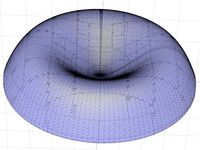
Solid of Revolution: Region below y=2x^2-2x^3 by MathObjects
...^2-2x^3 between x=0 and x=1. rotate the region down to the axis around the y-axis. this is the volume created.
created in matlab.
thingiverse
free

Solid of Revolution: Region between y=4x-x^2 and y=x^2 by MathObjects
...4x-x^2 and g(x)=x^2. they enclose a region. rotate this region around the line x=4. this is the volume created.
created in maple.
thingiverse
free

Solid of Revolution: Region between y=5/x+3 and y=x by MathObjects
...nd 5 around the x-axis. this is the volume created.
created in maple.
there are two stls for this - a sharp and a smooth version.
thingiverse
free

Solid of Revolution: between y=x and y=x^2 by MathObjects
...ith supports with the large side on the bottom, though. that's why it came out a bit rough in the picture.
created in matlab.