
Thingiverse
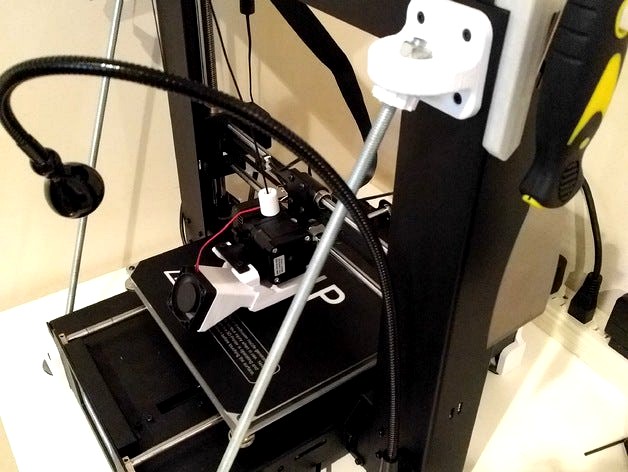
Wanhao Duplicator i3 IKEA JANSJÖ Bottom Mount by Luddy
by Thingiverse
Last crawled date: 4 years, 7 months ago
This is a bracket to mount the IKEA JANSJÖ LED work lamp to the bottom front of your Wanhao Duplicator i3 Plus X/Z axis uprights. I measured this off an Monoprice Maker Select Plus and am unsure if it fits the regular Maker Select or Duplicator i3.
I modified the Duplicator i3 Lamp Mount by Drazen concept by moving it to the bottom of the printer. I did this because I could not mount my lights to the top since I mounted a Raspberry Pi for Octoprint on one side, and a tool holder on the other.
To install:
1- Remove the outermost two M3x5mm bolts.
2- Attach bracket using M3x10mm (or longer) bolts
3- Insert IKEA JANSJÖ LED lamp. The clearance is very close on the bottom bolt, but it should fit with a little effort.
4- Screw the bolts supplied with the IKEA JANSJÖ LED lamp into the bottom of the bracket.
If you are running your printer off a SD card and not OctoPrint, I would recommend you rename the gcode file you generate so that it does not have a Ö character in it. It might crash your printer.
I modified the Duplicator i3 Lamp Mount by Drazen concept by moving it to the bottom of the printer. I did this because I could not mount my lights to the top since I mounted a Raspberry Pi for Octoprint on one side, and a tool holder on the other.
To install:
1- Remove the outermost two M3x5mm bolts.
2- Attach bracket using M3x10mm (or longer) bolts
3- Insert IKEA JANSJÖ LED lamp. The clearance is very close on the bottom bolt, but it should fit with a little effort.
4- Screw the bolts supplied with the IKEA JANSJÖ LED lamp into the bottom of the bracket.
If you are running your printer off a SD card and not OctoPrint, I would recommend you rename the gcode file you generate so that it does not have a Ö character in it. It might crash your printer.