
Thingiverse
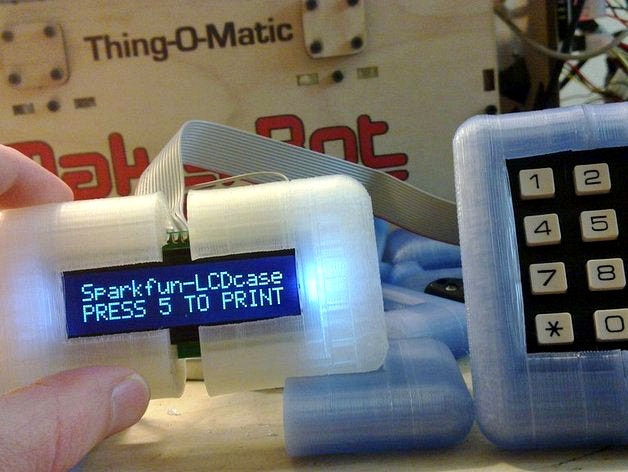
Thing-O-Matic Control Panel by ScribbleJ
by Thingiverse
Last crawled date: 5 years, 2 months ago
This is the obvious follow-on to my last Thingiverse entry, the LCD Temperature display: http://www.thingiverse.com/thing:6753
This one has a keypad. Even with that, you can probably squeak in just under $20 for all the parts.
CURRENTLY DOES:
Temperature Monitoring Screen
Scrollable Error/Other Logging Screen
SD Card File Selection and PRINT QUEUE
Yes, queued up prints from SD Card files... Almost makes me want to put my ABP back on. Not even RepG will do this.
Print Queue Management: delete, add, start, stop, abort current (not even RepG will do that! - it just resets the system).
Control Menu: Select screens from friendly menu, abort print, reset printer, destroy universe -- Not even RepG can do that!
Pause/Resume with BYPASS: the print will pause but you can jog the motors, rehome, and such, then resume right where you left off. Not even RepG will do this.
Motor controls, move X,Y,Z,A,B -- even while a print is paused!!
WIP WHY:
MANY features still to add!
Brand new, hardly tested!
Firmware .hex file uploaded below is from my machine, with 2 toolheads.
I'm verbose by nature so I'm sure I'll have more to say, but I'm mostly busy coding on this right now, so I'll get back to you.
YOUTUBE VIDEOS:
Initial test: http://www.youtube.com/watch?v=0prldLWJgzk
Queuing up a (single) file to print: http://www.youtube.com/watch?v=mcbtRGPwFbU
Testing pause + motor override... FAIL!: http://www.youtube.com/watch?v=lebdaPDFlJk
-- It /should/ stay paused on the motor menu and let me do what I want, but instead when I go to the motor menu it resumes printing. FUnny enough, the command override does work, you'll see me raise Z a couple times and then it immediately goes back to where it was. :)
UPDATE (v2):
Added queued print functionality, so you can pick a whole bunch of files off the SD card (or the same one a whole bunch of times) and the system will print them one after the other. Does RepG still want you to do this manually by copypasting gcode?
UPDATE (v3):
Added a bunch of features to the print queue, and a menu. Added abort print, reset printer, and destroy universe commands.
UPDATE (v4):
Added motor control menu... needs to be simplified a bit but it all works. This release changes the semantics of the 'pause' control in RepG and elsewhere; now it pauses as soon as it finishes the current movement, instead of immediately. Should be a minor difference, I hope.
UPDATE -- noV:
I think I got myself up and running on github. Let me know if I'm doin' it right. Quite a bit different than my SVN!
https://github.com/ScribbleJ
This one has a keypad. Even with that, you can probably squeak in just under $20 for all the parts.
CURRENTLY DOES:
Temperature Monitoring Screen
Scrollable Error/Other Logging Screen
SD Card File Selection and PRINT QUEUE
Yes, queued up prints from SD Card files... Almost makes me want to put my ABP back on. Not even RepG will do this.
Print Queue Management: delete, add, start, stop, abort current (not even RepG will do that! - it just resets the system).
Control Menu: Select screens from friendly menu, abort print, reset printer, destroy universe -- Not even RepG can do that!
Pause/Resume with BYPASS: the print will pause but you can jog the motors, rehome, and such, then resume right where you left off. Not even RepG will do this.
Motor controls, move X,Y,Z,A,B -- even while a print is paused!!
WIP WHY:
MANY features still to add!
Brand new, hardly tested!
Firmware .hex file uploaded below is from my machine, with 2 toolheads.
I'm verbose by nature so I'm sure I'll have more to say, but I'm mostly busy coding on this right now, so I'll get back to you.
YOUTUBE VIDEOS:
Initial test: http://www.youtube.com/watch?v=0prldLWJgzk
Queuing up a (single) file to print: http://www.youtube.com/watch?v=mcbtRGPwFbU
Testing pause + motor override... FAIL!: http://www.youtube.com/watch?v=lebdaPDFlJk
-- It /should/ stay paused on the motor menu and let me do what I want, but instead when I go to the motor menu it resumes printing. FUnny enough, the command override does work, you'll see me raise Z a couple times and then it immediately goes back to where it was. :)
UPDATE (v2):
Added queued print functionality, so you can pick a whole bunch of files off the SD card (or the same one a whole bunch of times) and the system will print them one after the other. Does RepG still want you to do this manually by copypasting gcode?
UPDATE (v3):
Added a bunch of features to the print queue, and a menu. Added abort print, reset printer, and destroy universe commands.
UPDATE (v4):
Added motor control menu... needs to be simplified a bit but it all works. This release changes the semantics of the 'pause' control in RepG and elsewhere; now it pauses as soon as it finishes the current movement, instead of immediately. Should be a minor difference, I hope.
UPDATE -- noV:
I think I got myself up and running on github. Let me know if I'm doin' it right. Quite a bit different than my SVN!
https://github.com/ScribbleJ