
Thingiverse
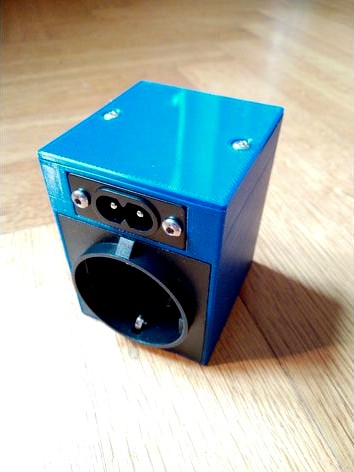
Socket Enclosure for ESP266 Moes QS-WiFi-D01 150W Dimmer
by Thingiverse
Last crawled date: 5 years, 10 months ago
A socket enclosure for a easy and safe connection of the Moes QS-WiFi-D01 150W Dimmer. A perfect solution for a easy to place WiFi controllable IOT dimmer.
Installation
Insert the outlet socket and push it in to place so the fingers of the outlet snap behind the case. insert the inlet socket and secure it with two M3 bolts and nuts. The dimmer is installed without its original case to save some space. The case of the module can easily be opened by pressing both sides of the lower half of the case. Connect the four wires to the dimming module. Slide the dimmer in the designated slot of the case. Slide the four insert spring connectors to there place. Be sure to check your connections!
Note: To set up the dimmer you first need to connect a switch to get it started (it is explained in the included manual). After that you can disconnect the switch. It is also possible to flash it with Tasmota using their instructions
Things needed
Moes QS-WiFi-D01 Dimmer AliExpress
EU German AC power socket AliExpress (I designed it for their E-08 socket)
IEC320 C8 2 Terminal Power Plug AliExpress
4.8mm insert spring female AliExpress
2.8mm insert spring female AliExpress
2 Pcs M3X3X5mm Copper Inserts Brass AliExpress
Power Cord Cable EU 2-Prong AliExpress
4 Pcs M3*8mm screws AliExpress
2 Pcs M3 nuts
(Optional) Tubular terminal crimping mini electrical pliers AliExpress
In the future I may add a switch to the design and redesign the cover to be a strong snapfit so two screw and the brasfits won't be necessary anymore.
Installation
Insert the outlet socket and push it in to place so the fingers of the outlet snap behind the case. insert the inlet socket and secure it with two M3 bolts and nuts. The dimmer is installed without its original case to save some space. The case of the module can easily be opened by pressing both sides of the lower half of the case. Connect the four wires to the dimming module. Slide the dimmer in the designated slot of the case. Slide the four insert spring connectors to there place. Be sure to check your connections!
Note: To set up the dimmer you first need to connect a switch to get it started (it is explained in the included manual). After that you can disconnect the switch. It is also possible to flash it with Tasmota using their instructions
Things needed
Moes QS-WiFi-D01 Dimmer AliExpress
EU German AC power socket AliExpress (I designed it for their E-08 socket)
IEC320 C8 2 Terminal Power Plug AliExpress
4.8mm insert spring female AliExpress
2.8mm insert spring female AliExpress
2 Pcs M3X3X5mm Copper Inserts Brass AliExpress
Power Cord Cable EU 2-Prong AliExpress
4 Pcs M3*8mm screws AliExpress
2 Pcs M3 nuts
(Optional) Tubular terminal crimping mini electrical pliers AliExpress
In the future I may add a switch to the design and redesign the cover to be a strong snapfit so two screw and the brasfits won't be necessary anymore.