
Thingiverse
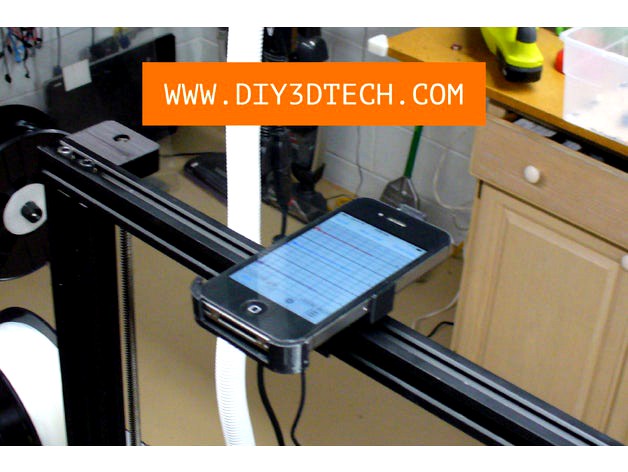
Smartphone Vibration Sensor Mount for 20 x 20 Marker Rail! by DIY3DTech
by Thingiverse
Last crawled date: 4 years, 7 months ago
So I wanted to study the vibration signatures of my 3D printers and it hit me that the easiest (also quickest) was to use an older iPhone 4s which I was using for timelapse videos but how to mount it? Well I found a bike mount on Thinigiverse which was written in Open-SCAD and (here is the orignal: https://www.thingiverse.com/thing:426872) was able to modify it from a round tube to a square one for the 20 x 20 maker-rail on many of my printers. Then I needed an app and while I am an Apple Dev, by the time wrote and debuged something it was easier to just go the iOS App Store and get a pre-made App and found this gem (http://diy3dtech.com/iphone-vibration-sensor-app/ ) which fit the bill and it was off to the races and has been a quite an interesting project!
Note: I have added an STL for the iPhone 5s as well as the mod-ed Open-SCAD code to create your own.
Sample Excel can be downloaded here: http://diy3dtech.com/vibration-study/ so you can see what the data stream looks like as well as the some of the potential formatting of the data.
Major Favor: if you make one of these please post the Make and share it with the community :-) .
Also, please follow us on Thingiverse and give this a like if this came in handy and for more information on this project, please visit us at http://www.DIY3DTech.com as well as subscribe to our YouTube Channel at http://YouTube.DIY3DTech.com along with a visit to our drone site and YouTube channel at http://video-drone.DIY3DTech.com
If you are looking for one of a kind swag shop for yourself or a Maker Geek friend, visit our swag shop at http://Swag.DIY3DTech.com for unique 3D Printing, Laser Cutting and CNC swag! Too, if you want a behind the scene look at what we are working on be sure to follow us on Instagram (https://www.instagram.com/diy3dtech/)!
Note: I have added an STL for the iPhone 5s as well as the mod-ed Open-SCAD code to create your own.
Sample Excel can be downloaded here: http://diy3dtech.com/vibration-study/ so you can see what the data stream looks like as well as the some of the potential formatting of the data.
Major Favor: if you make one of these please post the Make and share it with the community :-) .
Also, please follow us on Thingiverse and give this a like if this came in handy and for more information on this project, please visit us at http://www.DIY3DTech.com as well as subscribe to our YouTube Channel at http://YouTube.DIY3DTech.com along with a visit to our drone site and YouTube channel at http://video-drone.DIY3DTech.com
If you are looking for one of a kind swag shop for yourself or a Maker Geek friend, visit our swag shop at http://Swag.DIY3DTech.com for unique 3D Printing, Laser Cutting and CNC swag! Too, if you want a behind the scene look at what we are working on be sure to follow us on Instagram (https://www.instagram.com/diy3dtech/)!