
Thingiverse
SD Card Socket (Full-Size) for Hobby Electronics by bhunt
by Thingiverse
Last crawled date: 4 years, 7 months ago
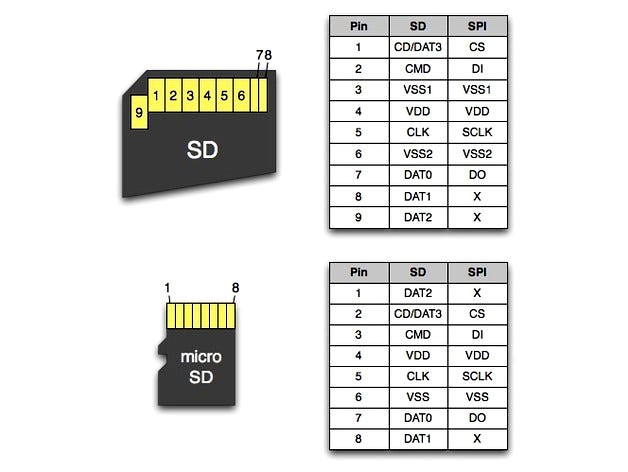
This is a simple friction-fit SD card socket, which uses long-lead female pin headers to breakout the SD pins for your electronics project. Note that the pins broken out are for the 1-bit SPI protocol, not the 4-bit SD protocol. As a result, only seven pins are needed.
You will need:
1) The two printed parts
2) 7-pin female pin header, with long springy leads (0.100 inch)
Instructions:
1) Print the two parts.
2) Insert your female pin header into the center-ish row of holes, from the bottom. (See photos.)
3) Bend the leads over toward the back edge and shape them to make a springy contact. (See photos.)
4) Ignore the second row of holes, nearest the edge; I was experimenting with using copper wire for contacts but it didn't work.
5) You can either bend the header flat under the socket and glue it in place, or leave it vertical and insert some male-male pin headers to make it breadboard-friendly. (See photos.)
6) Slide the top cap onto the bottom part. It should fit snugly, and your SD card should slide in snugly too. Held in place with friction.
You will need:
1) The two printed parts
2) 7-pin female pin header, with long springy leads (0.100 inch)
Instructions:
1) Print the two parts.
2) Insert your female pin header into the center-ish row of holes, from the bottom. (See photos.)
3) Bend the leads over toward the back edge and shape them to make a springy contact. (See photos.)
4) Ignore the second row of holes, nearest the edge; I was experimenting with using copper wire for contacts but it didn't work.
5) You can either bend the header flat under the socket and glue it in place, or leave it vertical and insert some male-male pin headers to make it breadboard-friendly. (See photos.)
6) Slide the top cap onto the bottom part. It should fit snugly, and your SD card should slide in snugly too. Held in place with friction.