
Thingiverse
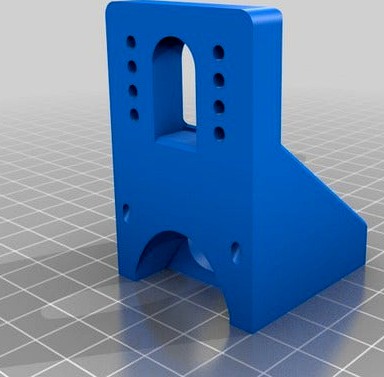
Scalar Front / Back fan cooling fan duct by 3DModularSystems
by Thingiverse
Last crawled date: 4 years, 7 months ago
Description
This part is a blower fan duct mount for 40mm axial fans compatible with Scalar family 3D printers (Scalar S, Scalar L, Scalar XLPremium).
Where to install them
You will find 2 parts:
40mmFanHolder_Front.stl
40mmFanHolder_Back-2.stl
Their mounts are made so that you can install them on the front or at the back of the X carriage.
The air flow angle is different depending on the front or back part, so pay attention where you are mounting each model.
What are the other cases where i need this part?
You will need the back part if you are installing the 3DTox.
The 3DTox nozzle will replace the front fan.
The front fan will be relocated at the back of the carriage.
You will need the "back" part in order to orient the fan airflow to reach the hot end nozzle.
The airflow will push the particules toward the 3Dtox nozzle in order to optimise the airflow
Requirements
You will need
2x 3 X12mm screws for plastic
4x 3x16mm screws for plastic
Updates
2018.08.08 original post
Compatibility
This partis compatible with the Scalar Family 3D Printers ( Scalar S , Scalar L, Scalar XL, Scalar XLPremium)
The 3D printers kits can be found here:http://3dmodularsystems.com
Where to find the parts
40mm fans can be found here:
about 4200 rpm : http://3dmodularsystems.com/en/electronic/394-40x40x10mm-aaa-12v-dc-fan.html
6500 rpm: http://3dmodularsystems.com/en/electronic/26-6500rpm-40mm-fan-12v-dc-713-cfm.html
15000 rpm: http://3dmodularsystems.com/en/fan/391-15000rpm-40mm-12v-dc-fan-1416cfm.html
Noctua NF-A4X10 FLX: http://3dmodularsystems.com/en/fan/510--noctua-ventilateur-nf-a4x10-flx-40x40x10mm-45003700-rpm.html
Accessories
Dust filters for 40mm fans: http://3dmodularsystems.com/en/fan/529-4-cm-dust-filter-for-40mm-fans.html
2 pins wire extenders: http://3dmodularsystems.com/en/connectors/348-2pins-female-male-extender-wire-1meter-with-dupont-connectors-for-bltouch.html
How to open .RSDOC
Use Design Spark Mechanical software (free software - Windows only) in order to open the .rsdoc cad files provided.
Have a great printing experience!
3D Modular Systems
Evolutive 3D Printershttp://www.3dmodularsystems.com
Twitter: https://twitter.com/3dmodularsystem
Youtube: http://www.youtube.com/c/3DModularSystems3DPrinters
This part is a blower fan duct mount for 40mm axial fans compatible with Scalar family 3D printers (Scalar S, Scalar L, Scalar XLPremium).
Where to install them
You will find 2 parts:
40mmFanHolder_Front.stl
40mmFanHolder_Back-2.stl
Their mounts are made so that you can install them on the front or at the back of the X carriage.
The air flow angle is different depending on the front or back part, so pay attention where you are mounting each model.
What are the other cases where i need this part?
You will need the back part if you are installing the 3DTox.
The 3DTox nozzle will replace the front fan.
The front fan will be relocated at the back of the carriage.
You will need the "back" part in order to orient the fan airflow to reach the hot end nozzle.
The airflow will push the particules toward the 3Dtox nozzle in order to optimise the airflow
Requirements
You will need
2x 3 X12mm screws for plastic
4x 3x16mm screws for plastic
Updates
2018.08.08 original post
Compatibility
This partis compatible with the Scalar Family 3D Printers ( Scalar S , Scalar L, Scalar XL, Scalar XLPremium)
The 3D printers kits can be found here:http://3dmodularsystems.com
Where to find the parts
40mm fans can be found here:
about 4200 rpm : http://3dmodularsystems.com/en/electronic/394-40x40x10mm-aaa-12v-dc-fan.html
6500 rpm: http://3dmodularsystems.com/en/electronic/26-6500rpm-40mm-fan-12v-dc-713-cfm.html
15000 rpm: http://3dmodularsystems.com/en/fan/391-15000rpm-40mm-12v-dc-fan-1416cfm.html
Noctua NF-A4X10 FLX: http://3dmodularsystems.com/en/fan/510--noctua-ventilateur-nf-a4x10-flx-40x40x10mm-45003700-rpm.html
Accessories
Dust filters for 40mm fans: http://3dmodularsystems.com/en/fan/529-4-cm-dust-filter-for-40mm-fans.html
2 pins wire extenders: http://3dmodularsystems.com/en/connectors/348-2pins-female-male-extender-wire-1meter-with-dupont-connectors-for-bltouch.html
How to open .RSDOC
Use Design Spark Mechanical software (free software - Windows only) in order to open the .rsdoc cad files provided.
Have a great printing experience!
3D Modular Systems
Evolutive 3D Printershttp://www.3dmodularsystems.com
Twitter: https://twitter.com/3dmodularsystem
Youtube: http://www.youtube.com/c/3DModularSystems3DPrinters