
Thingiverse
Sapphire Pro LED Strip Mount - Workspace Lighting
by Thingiverse
Last crawled date: 6 years, 2 months ago
Two Trees Sapphire Pro LED Strip Mount - Workspace Lighting
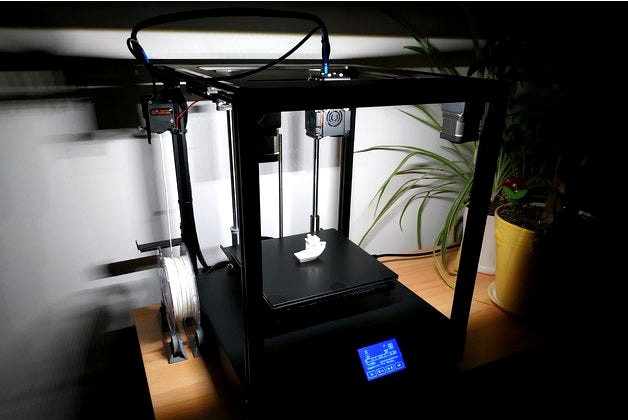
This very simple design allows you to illuminate the working space of the printer. It does not reduce the readability of the LCD display and does not dazzle the user. After installation, it looks like the factory part of the 3D printer.
The LED strip supply voltage should be set in the LM2596 converter according to your needs. I suggest around 9-10 V.
For this you need:
2 Allen screws M4x12 mm with T-nut
approx. 330 mm black anodized aluminum angle 16x11x1 mm
about 20 cm LED strip 4000K 10 mm wide
LM2596 buck converter
small switch and 2-wire cable.
The attached STL file concerns the left side of the printer. For the right side you must mirror the model in the slicer program.
Walls thickness 1.2 mm. Layer height 0.2 mm. Infill 30%.
This very simple design allows you to illuminate the working space of the printer. It does not reduce the readability of the LCD display and does not dazzle the user. After installation, it looks like the factory part of the 3D printer.
The LED strip supply voltage should be set in the LM2596 converter according to your needs. I suggest around 9-10 V.
For this you need:
2 Allen screws M4x12 mm with T-nut
approx. 330 mm black anodized aluminum angle 16x11x1 mm
about 20 cm LED strip 4000K 10 mm wide
LM2596 buck converter
small switch and 2-wire cable.
The attached STL file concerns the left side of the printer. For the right side you must mirror the model in the slicer program.
Walls thickness 1.2 mm. Layer height 0.2 mm. Infill 30%.