
Thingiverse
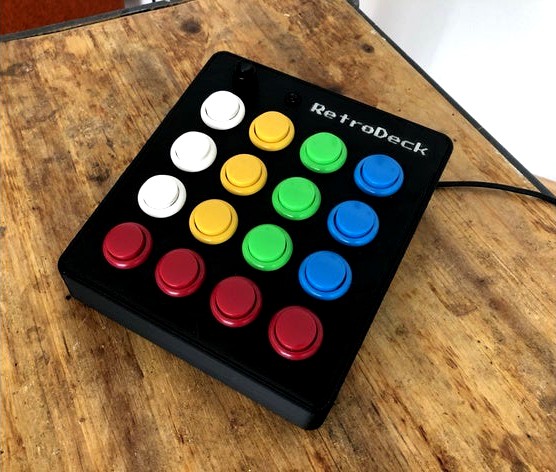
RetroDeck Arcade-Style (stream deck, macro button for OBS, Twitch etc.) by toto_1981
by Thingiverse
Last crawled date: 4 years, 8 months ago
A friend of mine is streaming on Twitch, so I thougt a cheap alternative to the Elgato Stream Deck would be fine.
This work ist still in progress, also the code for the Arduino Pro Micro.
I like the design of these arcade buttons.
You will find attached some cura files but also the Fusion 360 file.
I will post some updates in the near future.
Overly dramatic presentation: https://www.youtube.com/watch?v=PjOvE6alD2w
Feel free, to leave a comment.
The idea behind this is to use RetroDeck to operate OBS-Studio, mute the microphone and launch sounds from a sound deck.
At the moment I use it to play sounds during our gaming session via the macro buttons of VoiceMeeter Banana and as a throat button.
The Arduino Pro Mico is recognized as a keyboard by Win10 and passes keyboard commands. In my case Ctrl+F1-F9 and Shift+F1-F6. If the black button in the upper left corner is active, the orange LED lights up and more commands are available (so all keys are double assigned).
This work ist still in progress, also the code for the Arduino Pro Micro.
I like the design of these arcade buttons.
You will find attached some cura files but also the Fusion 360 file.
I will post some updates in the near future.
Overly dramatic presentation: https://www.youtube.com/watch?v=PjOvE6alD2w
Feel free, to leave a comment.
The idea behind this is to use RetroDeck to operate OBS-Studio, mute the microphone and launch sounds from a sound deck.
At the moment I use it to play sounds during our gaming session via the macro buttons of VoiceMeeter Banana and as a throat button.
The Arduino Pro Mico is recognized as a keyboard by Win10 and passes keyboard commands. In my case Ctrl+F1-F9 and Shift+F1-F6. If the black button in the upper left corner is active, the orange LED lights up and more commands are available (so all keys are double assigned).