
Thingiverse
Raspberry Pi Retrogaming Case by Eguin
by Thingiverse
Last crawled date: 4 years, 11 months ago
Made by Eli Roth.
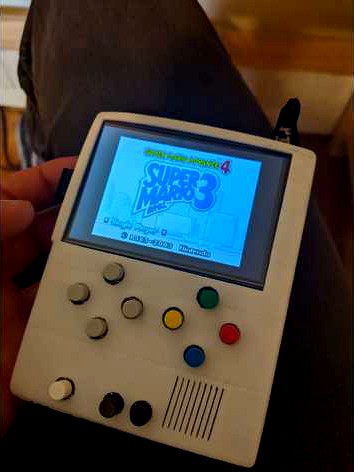
The case I made for a retro-gaming raspberry pi.
I installed RetroPie onto my raspberry pi to make this possible: https://retropie.org.uk/
I also used retrogame to allow the use of buttons through the gpio pins: https://learn.adafruit.com/retro-gaming-with-raspberry-pi/adding-controls-hardware
For the parts that I got on amazon
Screen: https://www.amazon.com/gp/product/B01N447AEY/ref=ppx_yo_dt_b_search_asin_title?ie=UTF8&psc=1
Buttons: https://www.amazon.com/gp/product/B07QH9WV12/ref=ppx_yo_dt_b_search_asin_title?ie=UTF8&psc=1
On-off switch: https://www.amazon.com/gp/product/B08H58MZNL/ref=ppx_yo_dt_b_search_asin_title?ie=UTF8&psc=1
Battery: https://www.amazon.com/gp/product/B07BTRKD77/ref=ppx_yo_dt_b_search_asin_title?ie=UTF8&psc=1
Charging module: https://www.amazon.com/gp/product/B0852NMRZ3/ref=ppx_yo_dt_b_search_asin_title?ie=UTF8&psc=1
Speakers amp: https://www.amazon.com/gp/product/B07P38H4P8/ref=ppx_yo_dt_b_search_asin_title?ie=UTF8&psc=1
PCB board: https://www.amazon.com/gp/product/B081K18P9Q/ref=ppx_yo_dt_b_search_asin_title?ie=UTF8&psc=1
Many of these I bought in bulk for use in future projects, and if you have similar things already can be used in their place.
In addition, the speaker I used I had laying around already, but any small speaker should suit fine.
To create it I used the buttons connected to the ground of the raspberry pi and the gpio pins. Which specific pins you used can be edited using retrogame and a slight but easy change to a file. The speaker I connected via vires to the audio output of the screen as to cause as minimal permanent changes to the pi as possible. The only thing I soldered on the pi was the 5V connected to the charging module since the screen was already taking the gpio port and it was hard to solder it only the 5V of the screen itself. The screen is connected to the pi using the included HDMI connector.
Enjoy!
The case I made for a retro-gaming raspberry pi.
I installed RetroPie onto my raspberry pi to make this possible: https://retropie.org.uk/
I also used retrogame to allow the use of buttons through the gpio pins: https://learn.adafruit.com/retro-gaming-with-raspberry-pi/adding-controls-hardware
For the parts that I got on amazon
Screen: https://www.amazon.com/gp/product/B01N447AEY/ref=ppx_yo_dt_b_search_asin_title?ie=UTF8&psc=1
Buttons: https://www.amazon.com/gp/product/B07QH9WV12/ref=ppx_yo_dt_b_search_asin_title?ie=UTF8&psc=1
On-off switch: https://www.amazon.com/gp/product/B08H58MZNL/ref=ppx_yo_dt_b_search_asin_title?ie=UTF8&psc=1
Battery: https://www.amazon.com/gp/product/B07BTRKD77/ref=ppx_yo_dt_b_search_asin_title?ie=UTF8&psc=1
Charging module: https://www.amazon.com/gp/product/B0852NMRZ3/ref=ppx_yo_dt_b_search_asin_title?ie=UTF8&psc=1
Speakers amp: https://www.amazon.com/gp/product/B07P38H4P8/ref=ppx_yo_dt_b_search_asin_title?ie=UTF8&psc=1
PCB board: https://www.amazon.com/gp/product/B081K18P9Q/ref=ppx_yo_dt_b_search_asin_title?ie=UTF8&psc=1
Many of these I bought in bulk for use in future projects, and if you have similar things already can be used in their place.
In addition, the speaker I used I had laying around already, but any small speaker should suit fine.
To create it I used the buttons connected to the ground of the raspberry pi and the gpio pins. Which specific pins you used can be edited using retrogame and a slight but easy change to a file. The speaker I connected via vires to the audio output of the screen as to cause as minimal permanent changes to the pi as possible. The only thing I soldered on the pi was the 5V connected to the charging module since the screen was already taking the gpio port and it was hard to solder it only the 5V of the screen itself. The screen is connected to the pi using the included HDMI connector.
Enjoy!