
Thingiverse
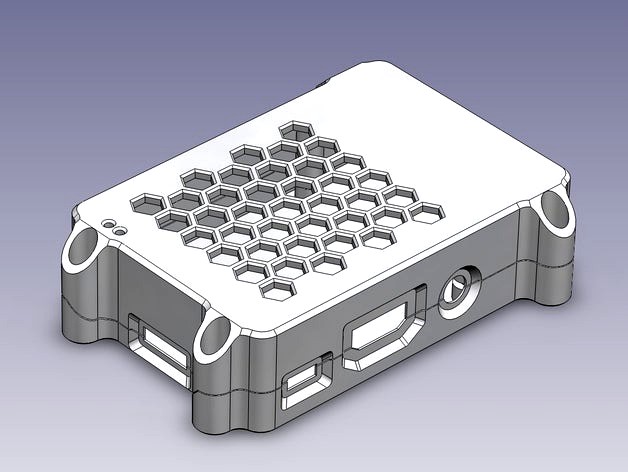
Raspberry Pi B+ / Pi 2 clam shell case by lukie80
by Thingiverse
Last crawled date: 4 years, 11 months ago
Another Raspberry Pi B+ / Pi 2 case. The differences to all those great cases out there on Thingiverse are:
Self centering clam-shell design: Light will not shine though the gaps, robust enclosure
No lateral space limitation for heat sinks
Additional round 5mm hole for some GPIO cables
Combines features of other cases:
The holes are well fit within an intentional tolerance of 0.5mm
Well tightened by common 10mm M3 screws and nuts
By using longer screws case can be stacked - see i.e. "usb_hub_shell" for DA-70215
Two holes for 2mm light gathering acrylic rods
Should be well printable without supports
Added a version with two M3 mounting holes and 70mm separation
If you like to add your own holes, mounting options or like to close the venting grid, I have provided the corresponding STEP files.
At this point a friendly reminder for Pi Owners: There are different USB cables out there. Watch out for the AWG number which is related to the diameter of the copper wire. Cheap (4€) and shi**y ones are around 34AWG (ca. 0.44V voltage drop @ 500mA and 1m) and best (8€) are around 20AWG (ca. 0.02V voltage drop @ 500mA and 1m). This means that your cheapest cable provides less than 4,6V to you Pi which will hardly operate and be in the low-voltage mode.
Self centering clam-shell design: Light will not shine though the gaps, robust enclosure
No lateral space limitation for heat sinks
Additional round 5mm hole for some GPIO cables
Combines features of other cases:
The holes are well fit within an intentional tolerance of 0.5mm
Well tightened by common 10mm M3 screws and nuts
By using longer screws case can be stacked - see i.e. "usb_hub_shell" for DA-70215
Two holes for 2mm light gathering acrylic rods
Should be well printable without supports
Added a version with two M3 mounting holes and 70mm separation
If you like to add your own holes, mounting options or like to close the venting grid, I have provided the corresponding STEP files.
At this point a friendly reminder for Pi Owners: There are different USB cables out there. Watch out for the AWG number which is related to the diameter of the copper wire. Cheap (4€) and shi**y ones are around 34AWG (ca. 0.44V voltage drop @ 500mA and 1m) and best (8€) are around 20AWG (ca. 0.02V voltage drop @ 500mA and 1m). This means that your cheapest cable provides less than 4,6V to you Pi which will hardly operate and be in the low-voltage mode.