
Thingiverse
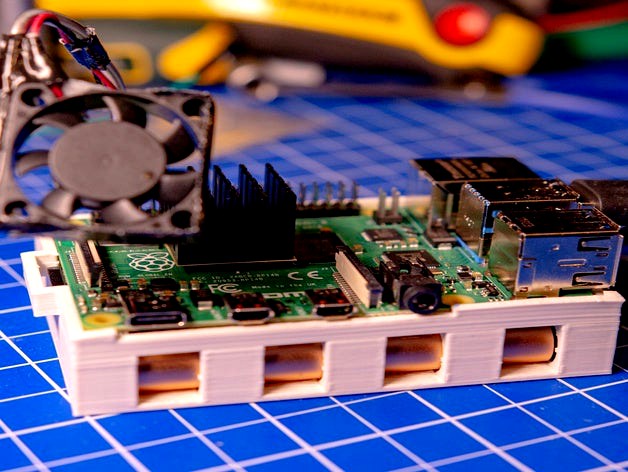
Raspberry Pi 4 & Samsung T5 SSD = Extreme Fast Pi --> cached read 7.2GBit/s :D (with instructions)
by Thingiverse
Last crawled date: 5 years, 10 months ago
Intro
Hey guys,
so I had some issues with the SD-Card speed of the Pi 4... I was hoping for a bit faster SD-Card Slot, which was not the case at all. So I added a Samsung T5 1TB SSD to it and moved the filesystem to the T5. Why? Because of 900MB/s timing cached reads:
Speedtest (yep, thats Megabytes - not Megabits)
With cache
pi@pi4t5:~ $ sudo hdparm -tT /dev/sda2
/dev/sda2:
Timing cached reads: 1798 MB in 2.00 seconds = 899.31 MB/sec
Timing buffered disk reads: 1078 MB in 3.00 seconds = 358.84 MB/sec
Without cache
pi@pi4t5:~ $ sudo hdparm -tT --direct /dev/sda2
/dev/sda2:
Timing O_DIRECT cached reads: 552 MB in 2.01 seconds = 275.29 MB/sec
Timing O_DIRECT disk reads: 862 MB in 3.00 seconds = 287.21 MB/sec
Installation Instructions
Don't have any clue on how to set this up? Keep cool, its easy. First of all, make sure you got a Pi 4 (because of USB3) and a Samsung T5 (size doesnt matter in this case). Keep a eye on different Samsung T5 sellers, because the price jumps around like bitcoin tickers ^^. If you got it, follow those steps:
1. Throw that STL into your printer, as it takes longer to print than you need to set up the pi&ssd
2. Just follow these instructions. It does not take as long as paulv wrote in 2013.... I did it in less than 10 minutes easily.
3. You propably want to act as a linux user on the SSD. So optionally you could create a new user and create his home directory on /mnt/my_data/home/username
Thats it. Super easy. Now you got a SUPERFAST Pi. Keep an eye on the CPU temperature. It rises way faster if you give the Pi more bits to eat... I highly recommend some active cooling.
FAQ
Is it working without any issues?
Yep. No problems so far. I was massivly using the T5 for some hours now, and I did not have any issues. The T5 is getting warm. But this is normal... I used the T5 for quite some month now and daily moved hundreds of gigabytes to and from it. I had no issues with the SSD so far (which is way i decided to NOT install a standard SATA SSD).
What happens if I plug off the SSD?
IF you do that, than please power of the Pi before. Your Pi won't run/boot without the SSD after you moved the filesystem on it... I think thats quite logic.
Why don't you fix the Pi with plastic screws in the case?
I had really really really many Pi's now (like >40?)... Most of them are still running anywhere in the world. However I learned: If you use some strong cables (Ethernet, USB3, USB-C Power,HDMI,....), then you should NOT use screws. In worst case, they literally damage your Pi. Happend 3 times to me now. You can fix the Pi to the case with some rubber band or the hair tie of your sister.
Hey guys,
so I had some issues with the SD-Card speed of the Pi 4... I was hoping for a bit faster SD-Card Slot, which was not the case at all. So I added a Samsung T5 1TB SSD to it and moved the filesystem to the T5. Why? Because of 900MB/s timing cached reads:
Speedtest (yep, thats Megabytes - not Megabits)
With cache
pi@pi4t5:~ $ sudo hdparm -tT /dev/sda2
/dev/sda2:
Timing cached reads: 1798 MB in 2.00 seconds = 899.31 MB/sec
Timing buffered disk reads: 1078 MB in 3.00 seconds = 358.84 MB/sec
Without cache
pi@pi4t5:~ $ sudo hdparm -tT --direct /dev/sda2
/dev/sda2:
Timing O_DIRECT cached reads: 552 MB in 2.01 seconds = 275.29 MB/sec
Timing O_DIRECT disk reads: 862 MB in 3.00 seconds = 287.21 MB/sec
Installation Instructions
Don't have any clue on how to set this up? Keep cool, its easy. First of all, make sure you got a Pi 4 (because of USB3) and a Samsung T5 (size doesnt matter in this case). Keep a eye on different Samsung T5 sellers, because the price jumps around like bitcoin tickers ^^. If you got it, follow those steps:
1. Throw that STL into your printer, as it takes longer to print than you need to set up the pi&ssd
2. Just follow these instructions. It does not take as long as paulv wrote in 2013.... I did it in less than 10 minutes easily.
3. You propably want to act as a linux user on the SSD. So optionally you could create a new user and create his home directory on /mnt/my_data/home/username
Thats it. Super easy. Now you got a SUPERFAST Pi. Keep an eye on the CPU temperature. It rises way faster if you give the Pi more bits to eat... I highly recommend some active cooling.
FAQ
Is it working without any issues?
Yep. No problems so far. I was massivly using the T5 for some hours now, and I did not have any issues. The T5 is getting warm. But this is normal... I used the T5 for quite some month now and daily moved hundreds of gigabytes to and from it. I had no issues with the SSD so far (which is way i decided to NOT install a standard SATA SSD).
What happens if I plug off the SSD?
IF you do that, than please power of the Pi before. Your Pi won't run/boot without the SSD after you moved the filesystem on it... I think thats quite logic.
Why don't you fix the Pi with plastic screws in the case?
I had really really really many Pi's now (like >40?)... Most of them are still running anywhere in the world. However I learned: If you use some strong cables (Ethernet, USB3, USB-C Power,HDMI,....), then you should NOT use screws. In worst case, they literally damage your Pi. Happend 3 times to me now. You can fix the Pi to the case with some rubber band or the hair tie of your sister.