
Thingiverse
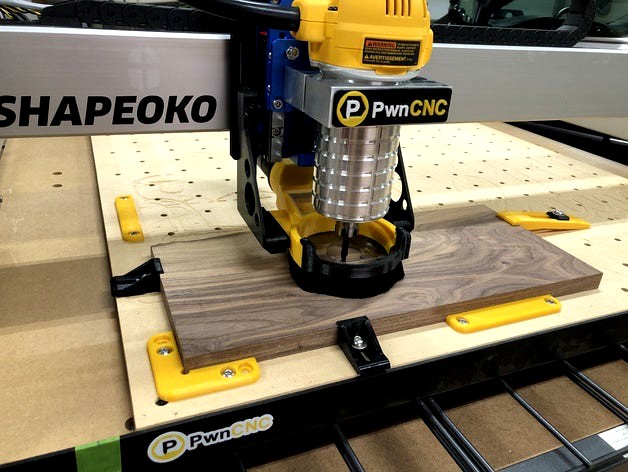
PwnCNC Dust Boot v2
by Thingiverse
Last crawled date: 5 years, 9 months ago
Are you interested in printing your own PwnCNC Dust Boot v2?
If you answered yes then this "thing" is for you. Print the following files from this "thing":
(1) Boot-v2g.stl
(1) Face-v2g.stl
(1) of the many Hose Adapter files that is appropriate for your extractor
Next you'll need to either cut your own acrylic out of a 1/8" sheet or purchase my pre-cut acrylic parts.
If you choose to cut your own, I've included 3 acrylic parts (window, boot, face). All of these are required to completely build this "thing". I've also included the Carbide Create file (Acrylic.c2d), in case that would be helpful.
Purchase Hardware
Go immediately over to https://pwncnc.com/purchase?olsPage=products%2Fhardware-v2
Under "Boot Hardware" choose the "Dust Boot v2f screws, heat-inserts, and magnets". I say immediately because I may update the boot files at anytime due to improvements.
I also have options for 1" brushes and pre-cut acrylic in case you need either of those.
Bracketing Systems
This "thing" is only the Dust Boot... but it is/will be compatible with multiple CNC's. Please choose the bracketing system for your brand and carriage.
Carbide 3d's Shapeoko 3:
Stock Bracketing System: https://www.thingiverse.com/thing:3996774
HDZ Bracketing System: https://www.thingiverse.com/thing:3981635
cnc4newbie Bracketing System: Coming Soon!
Inventables X-Carve:
Stock Bracketing System: Coming Soon!
TBD CNC Bracketing System: Coming Soon!
I'm working on an assembly guide for installing the hardware, but until then you can visit https://pwncnc.com/install to learn how to install these brackets onto your CNC.
Lastly... come join us in our facebook group where we and our users can help with any questions: https://www.facebook.com/groups/2993800347512326/
If you answered yes then this "thing" is for you. Print the following files from this "thing":
(1) Boot-v2g.stl
(1) Face-v2g.stl
(1) of the many Hose Adapter files that is appropriate for your extractor
Next you'll need to either cut your own acrylic out of a 1/8" sheet or purchase my pre-cut acrylic parts.
If you choose to cut your own, I've included 3 acrylic parts (window, boot, face). All of these are required to completely build this "thing". I've also included the Carbide Create file (Acrylic.c2d), in case that would be helpful.
Purchase Hardware
Go immediately over to https://pwncnc.com/purchase?olsPage=products%2Fhardware-v2
Under "Boot Hardware" choose the "Dust Boot v2f screws, heat-inserts, and magnets". I say immediately because I may update the boot files at anytime due to improvements.
I also have options for 1" brushes and pre-cut acrylic in case you need either of those.
Bracketing Systems
This "thing" is only the Dust Boot... but it is/will be compatible with multiple CNC's. Please choose the bracketing system for your brand and carriage.
Carbide 3d's Shapeoko 3:
Stock Bracketing System: https://www.thingiverse.com/thing:3996774
HDZ Bracketing System: https://www.thingiverse.com/thing:3981635
cnc4newbie Bracketing System: Coming Soon!
Inventables X-Carve:
Stock Bracketing System: Coming Soon!
TBD CNC Bracketing System: Coming Soon!
I'm working on an assembly guide for installing the hardware, but until then you can visit https://pwncnc.com/install to learn how to install these brackets onto your CNC.
Lastly... come join us in our facebook group where we and our users can help with any questions: https://www.facebook.com/groups/2993800347512326/