
Thingiverse
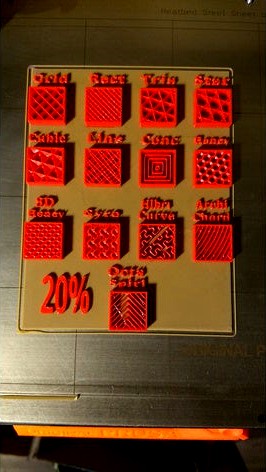
Prusa Slic3r 1.41.0 Infill types by builderdad
by Thingiverse
Last crawled date: 5 years ago
The stl file is the basic design without any infill types. The G-Code is sliced and printable. Please note the printer type for the G-Code you want to use.
To create your own infill density load the file into Slic3r. Select the settings button (next to cut)
A new window will open. Select the "load generic" tab and follow the screen-shot for the input numbers.
Select the green + sign and set the fill pattern. Select again and set top layer to zero.
Use the sliders to move the box over the desired block and set the Z for 1.1
Repeat for the remaining.
The Numbers for the Lambda Object are: 21, 21, 6
Ignore the numbers in the X/Y sliders. They will change as you move the block around the screen.
The Z is the only constant at 1.1
** TEVO User **
Please verify G-Code before using.
To create your own infill density load the file into Slic3r. Select the settings button (next to cut)
A new window will open. Select the "load generic" tab and follow the screen-shot for the input numbers.
Select the green + sign and set the fill pattern. Select again and set top layer to zero.
Use the sliders to move the box over the desired block and set the Z for 1.1
Repeat for the remaining.
The Numbers for the Lambda Object are: 21, 21, 6
Ignore the numbers in the X/Y sliders. They will change as you move the block around the screen.
The Z is the only constant at 1.1
** TEVO User **
Please verify G-Code before using.