
Thingiverse
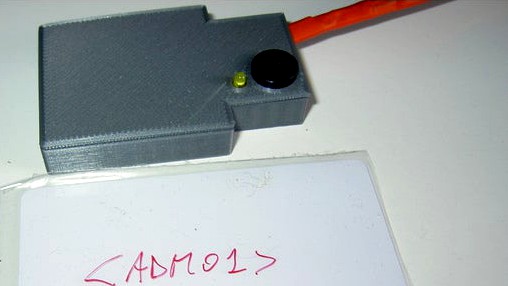
PN522 reader as keyboard using Cjmcu Beetle (ATMEGA32U4) by nid69ita
by Thingiverse
Last crawled date: 4 years, 8 months ago
PN522 reader that send data as keyaboard to PC using an CJMCU Beetle (ATMEGA32U4)
Beetle programmed as Leonardo using Arduino IDE 1.8.5. PN522 set as I2C using dip on module (1=on 2=off). A yellow led with resistor is on when ready, active buzzer beep when good, double beep when wrong card (and led blink). I read max 16 char from card in block 5. I add < and > char for my purpose. Very hard to send to my italian keyaboard, keyboard.h library is for english keyboard scancode
Libraries: Adafruit_PN532.h and Keyboar.h for leonardo
Code (missing hashtag char):
include //Keyboard.h
include // Wire.h
include //Adafruit_PN532.h
define PN532_IRQ A0
define PN532_RESET 15
define PIN_TONE 11
define PIN_LED 10
define PLAY_ERROR tone(11, 100,500)
define PLAY_OKAY1 tone(11, 600, 200)
define PLAY_OKAY2 tone(11, 700, 200)
uint8_t success; // Flag to check if there was an error with the PN532
uint8_t uid[] = { 0, 0, 0, 0, 0, 0, 0 }; // Buffer to store the returned UID
uint8_t uidLength; // Length of the UID (4 or 7 bytes depending on ISO14443A card type)
uint8_t currentblock; // Counter to keep track of which block we're on
bool authenticated = false; // Flag to indicate if the sector is authenticated
uint8_t data[16]; // Array to store block data during reads
uint8_t keyuniversal[6] = { 0xFF, 0xFF, 0xFF, 0xFF, 0xFF, 0xFF }; // Keyb on NDEF and Mifare Classic should be the same
Adafruit_PN532 nfc(PN532_IRQ, PN532_RESET);
void setup(void)
{ delay(1000);
pinMode(PIN_LED, OUTPUT);
nfc.begin();
uint32_t versiondata = nfc.getFirmwareVersion();
if (! versiondata)
{ PLAY_ERROR;
PLAY_ERROR;
while (1)
{ digitalWrite(PIN_LED, HIGH);
delay(300);
digitalWrite(PIN_LED, LOW);
}; // halt
}
nfc.SAMConfig(); // configure board to read RFID tags
digitalWrite(PIN_LED, HIGH);
Keyboard.begin();
}
void loop(void)
{ // Wait a bit before trying again
digitalWrite(PIN_LED, LOW);
delay(2000);
digitalWrite(PIN_LED, HIGH);
success = nfc.readPassiveTargetID(PN532_MIFARE_ISO14443A, uid, &uidLength);
if (!success)
{ PLAY_ERROR;
return;
}
if (uidLength != 4)
{ PLAY_ERROR;
return;
}
// We probably have a Mifare Classic card ...
authenticated = false;
currentblock = 5;
if (nfc.mifareclassic_IsFirstBlock(currentblock)) authenticated = false;
if (!authenticated)
{ success = nfc.mifareclassic_AuthenticateBlock (uid, uidLength, currentblock, 1, keyuniversal);
if(!success) { PLAY_ERROR; return; }
authenticated = true;
}
// If we're still not authenticated just skip the block
// Authenticated ... we should be able to read the block now
success = nfc.mifareclassic_ReadDataBlock(currentblock, data);
if (!success)
{ PLAY_ERROR;
return;
}
// Read successful
for(int i=0;data[i]>0;i++)
{ if(data[i]=='<')
{ Keyboard.write(236); // <
}
else if(data[i]=='>')
{ Keyboard.press(KEY_LEFT_SHIFT);
Keyboard.write(236); // >
Keyboard.release(KEY_LEFT_SHIFT);
}
else
{ Keyboard.print((char)data[i]);
}
}
PLAY_OKAY1;
delay(100);
PLAY_OKAY2;
}
PCB Wires:
Yellow to led
Blue GND for led and buzzer
Green to buzzer
PN522:
Black GND
Red VCC
White to SDA
Gray to SCL
Purple to IRQ
Pink to RTS0
Beetle programmed as Leonardo using Arduino IDE 1.8.5. PN522 set as I2C using dip on module (1=on 2=off). A yellow led with resistor is on when ready, active buzzer beep when good, double beep when wrong card (and led blink). I read max 16 char from card in block 5. I add < and > char for my purpose. Very hard to send to my italian keyaboard, keyboard.h library is for english keyboard scancode
Libraries: Adafruit_PN532.h and Keyboar.h for leonardo
Code (missing hashtag char):
include //Keyboard.h
include // Wire.h
include //Adafruit_PN532.h
define PN532_IRQ A0
define PN532_RESET 15
define PIN_TONE 11
define PIN_LED 10
define PLAY_ERROR tone(11, 100,500)
define PLAY_OKAY1 tone(11, 600, 200)
define PLAY_OKAY2 tone(11, 700, 200)
uint8_t success; // Flag to check if there was an error with the PN532
uint8_t uid[] = { 0, 0, 0, 0, 0, 0, 0 }; // Buffer to store the returned UID
uint8_t uidLength; // Length of the UID (4 or 7 bytes depending on ISO14443A card type)
uint8_t currentblock; // Counter to keep track of which block we're on
bool authenticated = false; // Flag to indicate if the sector is authenticated
uint8_t data[16]; // Array to store block data during reads
uint8_t keyuniversal[6] = { 0xFF, 0xFF, 0xFF, 0xFF, 0xFF, 0xFF }; // Keyb on NDEF and Mifare Classic should be the same
Adafruit_PN532 nfc(PN532_IRQ, PN532_RESET);
void setup(void)
{ delay(1000);
pinMode(PIN_LED, OUTPUT);
nfc.begin();
uint32_t versiondata = nfc.getFirmwareVersion();
if (! versiondata)
{ PLAY_ERROR;
PLAY_ERROR;
while (1)
{ digitalWrite(PIN_LED, HIGH);
delay(300);
digitalWrite(PIN_LED, LOW);
}; // halt
}
nfc.SAMConfig(); // configure board to read RFID tags
digitalWrite(PIN_LED, HIGH);
Keyboard.begin();
}
void loop(void)
{ // Wait a bit before trying again
digitalWrite(PIN_LED, LOW);
delay(2000);
digitalWrite(PIN_LED, HIGH);
success = nfc.readPassiveTargetID(PN532_MIFARE_ISO14443A, uid, &uidLength);
if (!success)
{ PLAY_ERROR;
return;
}
if (uidLength != 4)
{ PLAY_ERROR;
return;
}
// We probably have a Mifare Classic card ...
authenticated = false;
currentblock = 5;
if (nfc.mifareclassic_IsFirstBlock(currentblock)) authenticated = false;
if (!authenticated)
{ success = nfc.mifareclassic_AuthenticateBlock (uid, uidLength, currentblock, 1, keyuniversal);
if(!success) { PLAY_ERROR; return; }
authenticated = true;
}
// If we're still not authenticated just skip the block
// Authenticated ... we should be able to read the block now
success = nfc.mifareclassic_ReadDataBlock(currentblock, data);
if (!success)
{ PLAY_ERROR;
return;
}
// Read successful
for(int i=0;data[i]>0;i++)
{ if(data[i]=='<')
{ Keyboard.write(236); // <
}
else if(data[i]=='>')
{ Keyboard.press(KEY_LEFT_SHIFT);
Keyboard.write(236); // >
Keyboard.release(KEY_LEFT_SHIFT);
}
else
{ Keyboard.print((char)data[i]);
}
}
PLAY_OKAY1;
delay(100);
PLAY_OKAY2;
}
PCB Wires:
Yellow to led
Blue GND for led and buzzer
Green to buzzer
PN522:
Black GND
Red VCC
White to SDA
Gray to SCL
Purple to IRQ
Pink to RTS0