
Thingiverse
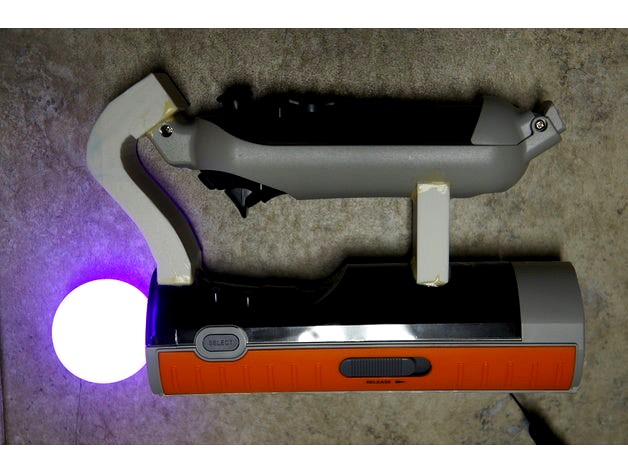
Playstation Move & Navigation Controller Joiner by petropixel
by Thingiverse
Last crawled date: 4 years, 8 months ago
In my continuing adventures with sim racing on a budget, I picked up a used Oculus Dev Kit 2 last year. It's great for racing sims, even with a PC that is below the recommended specs for VR, but when I wanted to take a detour into more general VR gaming, I discovered an issue with controls. Oculus' Touch controllers are not incredibly expensive, but they connect wirelessly to something inside the CV1 headset instead of directly to the computer over a standardized protocol, so it isn't usable with the dev kits. I could've maybe tracked down a Razer Hydra set, but the cheapest VR motion controller solution uses Playstation Move controllers: https://github.com/cboulay/PSMoveService/wiki
There are still issues with this setup, such as precision and play area size, but the biggest might be that the standard Move wand is not even close to "button parity" with the newer motion controllers most VR games are designed for. Sony would've had similar issues when initially designing the system, which is why they made the Move Navigation controller, which adds a joystick, D-pad, a second trigger and a shoulder button. However the Navi controller does not have any kind of motion tracking, so you can't play much with a Move wand in one hand and a Navi in the other. What you really want is both in each hand.
There are a lot of ideas on how to do this: https://github.com/cboulay/PSMoveService/wiki/PS-Move-and-Navigation-Controller-United and there are certainly simpler ways than this one. Initially I downloaded freely available 3D models of the Move and Navi controllers and tried to design my own completely 3D printed solution, but either due to plastic warping or inaccuracies in those models, my test print didn't even come close to fitting. I went back to the page I liked to and looked at the pictures from the "DualPlay" crowdfunding campaign. Usually I wouldn't want to rip off an unproduced design from a crowdfunding campaign, but on close inspection you can see that their prototypes were just cut-off parts from Sony Move SharpShooter accessories, glued together by bridges that were probably 3D printed and painted black. (The SharpShooter is the only mass-produced accessory with holders for both the Move wand and Navi controller). Before I started, that seemed like it would be easy enough to copy.
There are still issues with this setup, such as precision and play area size, but the biggest might be that the standard Move wand is not even close to "button parity" with the newer motion controllers most VR games are designed for. Sony would've had similar issues when initially designing the system, which is why they made the Move Navigation controller, which adds a joystick, D-pad, a second trigger and a shoulder button. However the Navi controller does not have any kind of motion tracking, so you can't play much with a Move wand in one hand and a Navi in the other. What you really want is both in each hand.
There are a lot of ideas on how to do this: https://github.com/cboulay/PSMoveService/wiki/PS-Move-and-Navigation-Controller-United and there are certainly simpler ways than this one. Initially I downloaded freely available 3D models of the Move and Navi controllers and tried to design my own completely 3D printed solution, but either due to plastic warping or inaccuracies in those models, my test print didn't even come close to fitting. I went back to the page I liked to and looked at the pictures from the "DualPlay" crowdfunding campaign. Usually I wouldn't want to rip off an unproduced design from a crowdfunding campaign, but on close inspection you can see that their prototypes were just cut-off parts from Sony Move SharpShooter accessories, glued together by bridges that were probably 3D printed and painted black. (The SharpShooter is the only mass-produced accessory with holders for both the Move wand and Navi controller). Before I started, that seemed like it would be easy enough to copy.