
Thingiverse
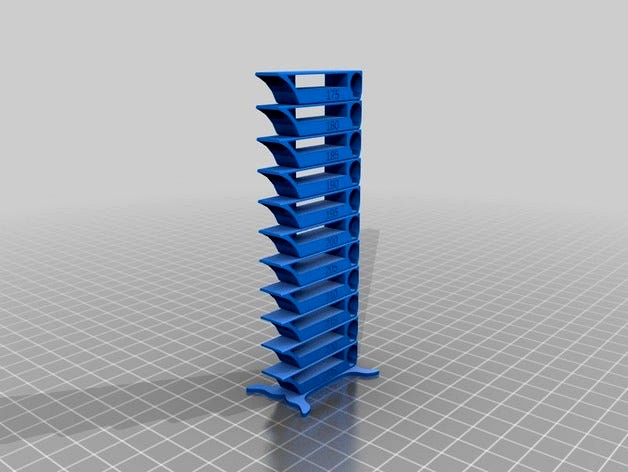
Parameterized Smart compact temperature calibration tower by petolone
by Thingiverse
Last crawled date: 4 years, 7 months ago
This is a remix of "Smart Compact Temperature Calibration Tower" by gaaZolee. The point is that with the included OpenSCAD code, one can easily generate any desired temperature set to test for.
As I did not want to start reverse engineering the STLs in the original design, I just imported the STLs of the base and one floor to OpenScad and then made a for loop to stack a given number of floors with corresponding temperature text.
Update 2018-03-24: Updated the code to allow selection of which way the temperature are stacked (low to high / high to low). The selection is made with parameter increasing_temp with a default value of 0 i.e. the tower will print starting from the highest temperature.
Big thanks to schlaubi666 for picking this up.
Update 2018-08-19 (Finally): Fixed the issue with the stand STL using Netfabb service. Big thanks to tkris_sd and steelfab who pin pointed the issue. My apologies for lettings this updated to hang for way too long. In the same go, I also removed the temperature marking present in the original floor STL (that I originally just hid in the SCAD code). Now just the correct temp number has to be embossed.
Update 2018-11-29: Restored the possibility of choosing the order of the temperatures: From high to low (=the code a is) or from low to high. Appologies: I don't know how I managed to reintroduce this mistake in my 2018-08-19 update.
Update 2018-12-29: Minor: Just cleaned up the description text.
As I did not want to start reverse engineering the STLs in the original design, I just imported the STLs of the base and one floor to OpenScad and then made a for loop to stack a given number of floors with corresponding temperature text.
Update 2018-03-24: Updated the code to allow selection of which way the temperature are stacked (low to high / high to low). The selection is made with parameter increasing_temp with a default value of 0 i.e. the tower will print starting from the highest temperature.
Big thanks to schlaubi666 for picking this up.
Update 2018-08-19 (Finally): Fixed the issue with the stand STL using Netfabb service. Big thanks to tkris_sd and steelfab who pin pointed the issue. My apologies for lettings this updated to hang for way too long. In the same go, I also removed the temperature marking present in the original floor STL (that I originally just hid in the SCAD code). Now just the correct temp number has to be embossed.
Update 2018-11-29: Restored the possibility of choosing the order of the temperatures: From high to low (=the code a is) or from low to high. Appologies: I don't know how I managed to reintroduce this mistake in my 2018-08-19 update.
Update 2018-12-29: Minor: Just cleaned up the description text.