
Thingiverse
OpenSCAD - bulk export from JSON/CSV to STL/PNG by OutwardB
by Thingiverse
Last crawled date: 4 years, 7 months ago
This is just a few scripts to make bulk exporting files via OpenSCAD easier. There are currently two:
CSV to JSON
Create a Parameter Sets JSON file from CSV data
JSON to STL
Export all Parameter Sets in a JSON file
I used these to easily export 1800 stl files for this project - https://www.thingiverse.com/thing:4837562
I've included a very basic SCAD file so you can see how they work. The scripts are labelled so you can see what they are doing and understand them without any PowerShell experience
They are written in PowerShell (sorry non-windows users) as it's already installed on every Windows 10 machine and I know it well enough.
Suggested actions to understand the scripts:
Export the files folder to C:\Temp\
Take a look at the SCAD file to understand the values
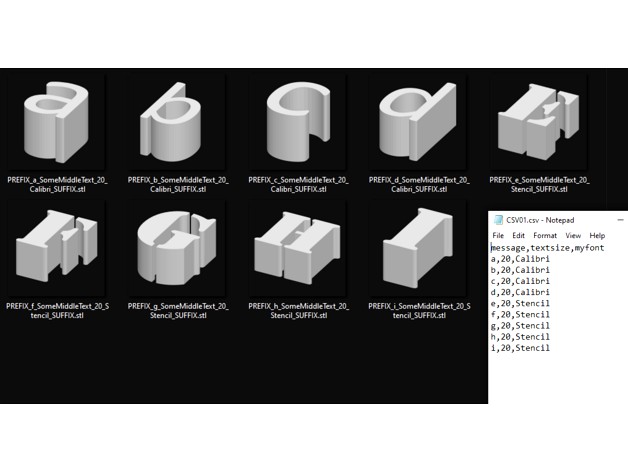
Check the CSV file to understand what we'll be creating
Read then run the first PowerShell file to create a JSON file full of parameter sets
Close and re-open the SCAD file and check the parameter sets
Read then run the second PowerShell file to create folder full of exported STLs
A quick note:
OpenSCAD needs the JSON file to have the same filename as the .SCAD file, or it will export the STLs with default parameters (e.g. File_Name.SCAD & File_Name.JSON)
More info on parameter sets, etc: https://en.wikibooks.org/wiki/OpenSCAD_User_Manual/Customizer
EDIT: Forgot to mention you can also export PNG files by changing .stl to .png in on line 34, then just set camera options in the $arguments varible on line 48 (of the JSON-to-STL.ps1 file):
$arguments = '-o "' + $OutputPath + '" --autocenter --camera=0,0,0,0,0,0,0 -p "' + $jsonPath + '" -P "' + $_.Name + '" "' + $scadPath + '"'
CSV to JSON
Create a Parameter Sets JSON file from CSV data
JSON to STL
Export all Parameter Sets in a JSON file
I used these to easily export 1800 stl files for this project - https://www.thingiverse.com/thing:4837562
I've included a very basic SCAD file so you can see how they work. The scripts are labelled so you can see what they are doing and understand them without any PowerShell experience
They are written in PowerShell (sorry non-windows users) as it's already installed on every Windows 10 machine and I know it well enough.
Suggested actions to understand the scripts:
Export the files folder to C:\Temp\
Take a look at the SCAD file to understand the values
Check the CSV file to understand what we'll be creating
Read then run the first PowerShell file to create a JSON file full of parameter sets
Close and re-open the SCAD file and check the parameter sets
Read then run the second PowerShell file to create folder full of exported STLs
A quick note:
OpenSCAD needs the JSON file to have the same filename as the .SCAD file, or it will export the STLs with default parameters (e.g. File_Name.SCAD & File_Name.JSON)
More info on parameter sets, etc: https://en.wikibooks.org/wiki/OpenSCAD_User_Manual/Customizer
EDIT: Forgot to mention you can also export PNG files by changing .stl to .png in on line 34, then just set camera options in the $arguments varible on line 48 (of the JSON-to-STL.ps1 file):
$arguments = '-o "' + $OutputPath + '" --autocenter --camera=0,0,0,0,0,0,0 -p "' + $jsonPath + '" -P "' + $_.Name + '" "' + $scadPath + '"'