
Thingiverse
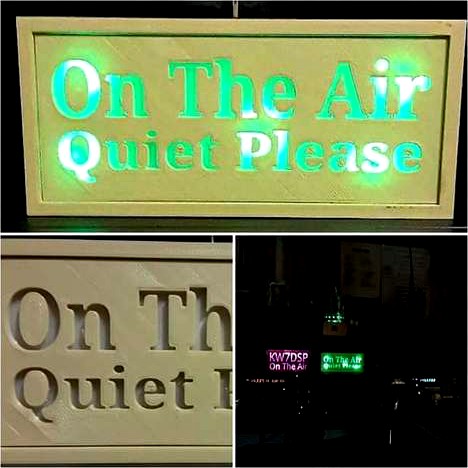
On The Air - Quiet Please by KW7DSP
by Thingiverse
Last crawled date: 5 years ago
The Photo is Mis-Spelled but corrected in the STL
Making the Panel
The panel is done two color. The first layer is Opaque (Light Passes Through), The second layer is a shadow or light blocking layer.
Watch the print at about half way through. The bottom of the letters should be finished and the sides of the letters with in-fill started. When the layer as started an outside wall pass, pause the print and if the head does not home such as in Repitier, immediately push the Park icon. Change filament to the solid color, and press resume or continue. Watch to make sure a few layers are indeed printing after changing the filament. Go about your business until finished or do as I do and set mesmerized watching. Wait for the glass bed (you are using glass, right?) cools to avoid warping when removing.
73 Steve Pickering KW7DSP
Making the Panel
The panel is done two color. The first layer is Opaque (Light Passes Through), The second layer is a shadow or light blocking layer.
Watch the print at about half way through. The bottom of the letters should be finished and the sides of the letters with in-fill started. When the layer as started an outside wall pass, pause the print and if the head does not home such as in Repitier, immediately push the Park icon. Change filament to the solid color, and press resume or continue. Watch to make sure a few layers are indeed printing after changing the filament. Go about your business until finished or do as I do and set mesmerized watching. Wait for the glass bed (you are using glass, right?) cools to avoid warping when removing.
73 Steve Pickering KW7DSP