
Thingiverse
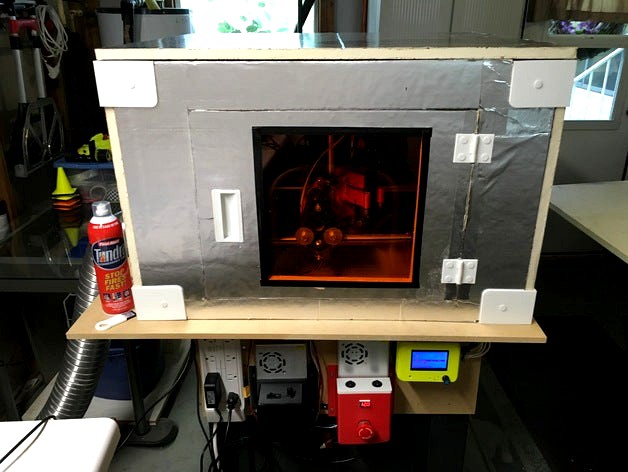
MPCNC Laser Enclosure by Flashsolutions
by Thingiverse
Last crawled date: 4 years, 7 months ago
After getting my 2W laser working, I realized that the smell of burned wood or other objects does not go away and permeates the shop, so I set about to enclose the Laser and exhaust the fumes outside.
For this project, I used 3/4" sheet insulation purchased from Home Depot as the base material and designed the parts around it.
You will need to print 8 corner pieces and 16 pins. For the hinges, you can print the complete set or individual parts, but you will need at least two sets of hinges to affix the door.
The recessed handle was obtained from Sketchup 3D Warehouse and resized to my needs.
I cut the insulation sheet by hand to the dimensions to fit my MPCNC layout. You will have to notch 1/8" indents for the corner pieces and cutout the recess area with a razor knife and maybe use a Dremel to carefully remove the foam if you don't want the handle to show on the back side of the door.
I have a 12"x12" laser safety sheet on order that I place in the door once it arrives. EDIT: safety glass arrived and is installed. See new photo.
I cut a 4" hole in one panel for the exhaust fan which I obtained from http://www.ebay.com/itm/281349615771?_trksid=p2057872.m2749.l2649&ssPageName=STRK%3AMEBIDX%3AIT
You could also build one if you have a box fan.... http://www.thingiverse.com/thing:42490
I bought a dryer vent for the outside wall and clamps from Home Depot to secure the vent hose.
EDIT: added the doorstop... You need to print 2 of those and glue them to back side to keep the door from swinging inward.
Also, I used liquid nails to glue the recessed handle in place.
Aug 10th 2016 EDIT: I have had one heck of a time finding suitable software to run my Laser. After many hours and trial and error, I ended up modifying a version of Marlin firmware and some python server software to convert images to GCODE.
If you would like to try out the image to GCODE software, you can point your browser to http://flashsolutions.us/img2gcode/index.html and generate your GCODE using a photo. It works very well with inkScape vector graphics saved to PNG or JPG images.
If you would like a copy to run on your PC, it is available on Github at https://github.com/flashsolutions/ along with the Marlin fork that I made to run on the MPCNC with Repetier Host.
For this project, I used 3/4" sheet insulation purchased from Home Depot as the base material and designed the parts around it.
You will need to print 8 corner pieces and 16 pins. For the hinges, you can print the complete set or individual parts, but you will need at least two sets of hinges to affix the door.
The recessed handle was obtained from Sketchup 3D Warehouse and resized to my needs.
I cut the insulation sheet by hand to the dimensions to fit my MPCNC layout. You will have to notch 1/8" indents for the corner pieces and cutout the recess area with a razor knife and maybe use a Dremel to carefully remove the foam if you don't want the handle to show on the back side of the door.
I have a 12"x12" laser safety sheet on order that I place in the door once it arrives. EDIT: safety glass arrived and is installed. See new photo.
I cut a 4" hole in one panel for the exhaust fan which I obtained from http://www.ebay.com/itm/281349615771?_trksid=p2057872.m2749.l2649&ssPageName=STRK%3AMEBIDX%3AIT
You could also build one if you have a box fan.... http://www.thingiverse.com/thing:42490
I bought a dryer vent for the outside wall and clamps from Home Depot to secure the vent hose.
EDIT: added the doorstop... You need to print 2 of those and glue them to back side to keep the door from swinging inward.
Also, I used liquid nails to glue the recessed handle in place.
Aug 10th 2016 EDIT: I have had one heck of a time finding suitable software to run my Laser. After many hours and trial and error, I ended up modifying a version of Marlin firmware and some python server software to convert images to GCODE.
If you would like to try out the image to GCODE software, you can point your browser to http://flashsolutions.us/img2gcode/index.html and generate your GCODE using a photo. It works very well with inkScape vector graphics saved to PNG or JPG images.
If you would like a copy to run on your PC, it is available on Github at https://github.com/flashsolutions/ along with the Marlin fork that I made to run on the MPCNC with Repetier Host.