
CG Trader
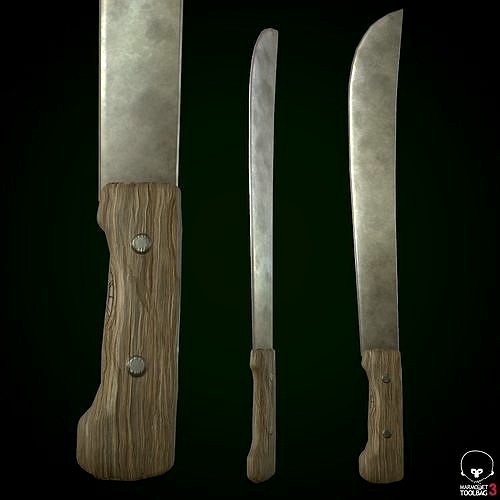
Machete
by CG Trader
Last crawled date: 4 years ago
Machete - PBR, Low poly - game ready. Made in Blender, textured in Substance Painter and Rendered in Marmoset Toolbag 3 Contains: 1 Machete -> 552_verts, 540_faces, 1088_tris Texture Workflow: Metallic Texture Sets: Standard, Unity, UE4 Texture Size: 4k, PNG (Textures can always be scaled down, in any software if needed) [For texture setup read my short tutorial at the end of this description, or in notepad provided in the texture zip file.] Formats: FBX, OBJ, COLLAD[DAE], BLENDER[ORIGINAL] System units: centimeters NOTE: I only provide you with Unity and Unreal Engine Textures and Not project example.
You have to Drag in, Textures and file formats into your project yourself. ___________ UE4 Textures Setup _______ Import Base color, Normal map and Roughness-AO-Mettalic (all baked into one map)
Double click Roughness-AO-Metallic and disable sRGB. Create Material: Drag these 3 maps into it. Base color and normal map connect to their inputs.
[Some of my assets don't have a normal map, so proceed without it] Set Roughness-AO-Metallic node to linear color (Only works if you turned off sRGB before) Connect RED channel to AO
GREEN to Roughness
BLUE to Metallic That's it. ___________ Unity Note _____________
FOR UNITY USE FBX! For Better results in Unity: I went to Edit>Project Settings>Player>Other Settings>ColorSpace and set it to Linear. That's what I did in my Unity photo example. [Set Normal map texture type in the inspector to normal map and apply] blade machete old old wooden handle handle knife sharp steel cutlery bladed weapon cutting wood meele survival combat knife survivalist cutlass military melee
You have to Drag in, Textures and file formats into your project yourself. ___________ UE4 Textures Setup _______ Import Base color, Normal map and Roughness-AO-Mettalic (all baked into one map)
Double click Roughness-AO-Metallic and disable sRGB. Create Material: Drag these 3 maps into it. Base color and normal map connect to their inputs.
[Some of my assets don't have a normal map, so proceed without it] Set Roughness-AO-Metallic node to linear color (Only works if you turned off sRGB before) Connect RED channel to AO
GREEN to Roughness
BLUE to Metallic That's it. ___________ Unity Note _____________
FOR UNITY USE FBX! For Better results in Unity: I went to Edit>Project Settings>Player>Other Settings>ColorSpace and set it to Linear. That's what I did in my Unity photo example. [Set Normal map texture type in the inspector to normal map and apply] blade machete old old wooden handle handle knife sharp steel cutlery bladed weapon cutting wood meele survival combat knife survivalist cutlass military melee