
Thingiverse
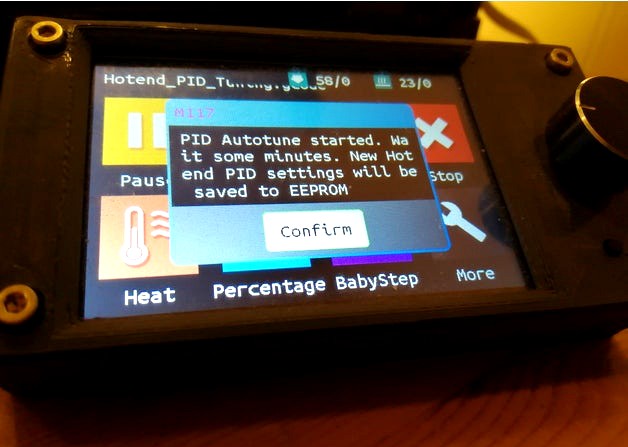
Hotend and Heatbed PID Tuning - Gcode programs
by Thingiverse
Last crawled date: 5 years, 9 months ago
PID Tuning your 3D Printer with Marlin Autotune
G-code file is making 3 cycles autotune PID for hotend. The new values will be saved to EEPROM automatically. You do not need G-code terminal. Just save program to SD card and press start.
Parameters like number of cycles (8), temperatures (200C, 60C), and fan speed (100%) you can simply modify by opening gcode file in text editor.
Requres: #define PIDTEMP or #define PIDBEDTEMP, #define EEPROM_SETTINGS
Hotend PID Tuning
Download gcode file, save to SD Card and run:
https://www.thingiverse.com/download:7832321
Source code Hotend_PID_Tuning.gcode:
;3D Printer - Hotend PID Marlin AutoTuning gcode file by DarekNorway https://www.thingiverse.com/DarekNorway/about
;Licence: Attribution-NonCommercial. You are free to Share (copy and redistribute it in any medium or format). You are free to adapt (remix, transform)
;V 1.0
;Requires: #define PIDTEMP, #define EEPROM_SETTINGS
M117 Prepare something to note current Hotend PID Values; Display info
G4 P15000; Wait 15 seconds
M301; Return the current Hotend PID setting from EEPROM
G4 P15000; Wait 15 seconds
M106 S255; Set cooling fan to 100%
G28; Home all axis
M117 PID Autotune started. Wait some minutes. New Hotend PID settings will be saved to EEPROM; Info
M303 E0 S200 C8 U1; Start Hotend PID tunning - First hotend, temp: 200deg, 8 Cycles. It takes some minutes, U1 will save new PID values to EEPROM (Requires #define EEPROM_SETTINGS)
M301; Return the current Hotend PID setting from EEPROM
G4 P15000; Wait 15 seconds
M84; Disable motors
M107; Cooling Fan off
M104 E0 S0; Set Hotend temp to 0C
M140 S0; Set Heatbed temp to 0C
M117 Hotend PID Tuning Done
G4 P4000
M117 By DarekNorway https://www.thingiverse.com/thing:4226437
G4 P4000
Touch screen Bigtreetech TFT 35 V3.0
Heatbed PID Tuning
Download gcode file, save to SD Card and run:
https://www.thingiverse.com/download:7833841 (Update:18.03.2020)
Source code Heatbed_PID_Tuning.gcode:
;3D Printer - Bed PID Marlin AutoTuning gcodegcode file by DarekNorway https://www.thingiverse.com/DarekNorway/about
;Licence: Attribution-NonCommercial. You are free to Share (copy and redistribute it in any medium or format). You are free to adapt (remix, transform)
;V 1.1
;Requires: #define PIDPBEDTEMP, #define EEPROM_SETTINGS
M117 Prepare something to note current Heatbed PID settings; Display info
G4 P15000; Wait 15 seconds
M304; Return the current Heatbed PID setting from EEPROM
G4 P15000; Wait 15 seconds
M106 S255; Set cooling fan to 100%
G28; Home all axis
M117 PID Autotune started. Wait some minutes. New Heatbed PID settings will be saved to EEPROM; Info
M303 E-1 S60 C8 U1; Start Heat Bed PID tunning, temp: 60deg, 8 Cycles. It takes some minutes, U1 will save new PID values to EEPROM (Requires #define EEPROM_SETTINGS)
M304; Return the current Heatbed PID setting from EEPROM
G4 P15000; Wait 15 seconds
M84; Disable motors
M107; Cooling Fan off
M104 E0 S0; Set Hotend temp to 0C
M140 S0; Set Heatbed temp to 0C
M117 Hotend PID Tuning Done
G4 P4000
M117 By DarekNorway https://www.thingiverse.com/thing:4226437
G4 P4000
G-code file is making 3 cycles autotune PID for hotend. The new values will be saved to EEPROM automatically. You do not need G-code terminal. Just save program to SD card and press start.
Parameters like number of cycles (8), temperatures (200C, 60C), and fan speed (100%) you can simply modify by opening gcode file in text editor.
Requres: #define PIDTEMP or #define PIDBEDTEMP, #define EEPROM_SETTINGS
Hotend PID Tuning
Download gcode file, save to SD Card and run:
https://www.thingiverse.com/download:7832321
Source code Hotend_PID_Tuning.gcode:
;3D Printer - Hotend PID Marlin AutoTuning gcode file by DarekNorway https://www.thingiverse.com/DarekNorway/about
;Licence: Attribution-NonCommercial. You are free to Share (copy and redistribute it in any medium or format). You are free to adapt (remix, transform)
;V 1.0
;Requires: #define PIDTEMP, #define EEPROM_SETTINGS
M117 Prepare something to note current Hotend PID Values; Display info
G4 P15000; Wait 15 seconds
M301; Return the current Hotend PID setting from EEPROM
G4 P15000; Wait 15 seconds
M106 S255; Set cooling fan to 100%
G28; Home all axis
M117 PID Autotune started. Wait some minutes. New Hotend PID settings will be saved to EEPROM; Info
M303 E0 S200 C8 U1; Start Hotend PID tunning - First hotend, temp: 200deg, 8 Cycles. It takes some minutes, U1 will save new PID values to EEPROM (Requires #define EEPROM_SETTINGS)
M301; Return the current Hotend PID setting from EEPROM
G4 P15000; Wait 15 seconds
M84; Disable motors
M107; Cooling Fan off
M104 E0 S0; Set Hotend temp to 0C
M140 S0; Set Heatbed temp to 0C
M117 Hotend PID Tuning Done
G4 P4000
M117 By DarekNorway https://www.thingiverse.com/thing:4226437
G4 P4000
Touch screen Bigtreetech TFT 35 V3.0
Heatbed PID Tuning
Download gcode file, save to SD Card and run:
https://www.thingiverse.com/download:7833841 (Update:18.03.2020)
Source code Heatbed_PID_Tuning.gcode:
;3D Printer - Bed PID Marlin AutoTuning gcodegcode file by DarekNorway https://www.thingiverse.com/DarekNorway/about
;Licence: Attribution-NonCommercial. You are free to Share (copy and redistribute it in any medium or format). You are free to adapt (remix, transform)
;V 1.1
;Requires: #define PIDPBEDTEMP, #define EEPROM_SETTINGS
M117 Prepare something to note current Heatbed PID settings; Display info
G4 P15000; Wait 15 seconds
M304; Return the current Heatbed PID setting from EEPROM
G4 P15000; Wait 15 seconds
M106 S255; Set cooling fan to 100%
G28; Home all axis
M117 PID Autotune started. Wait some minutes. New Heatbed PID settings will be saved to EEPROM; Info
M303 E-1 S60 C8 U1; Start Heat Bed PID tunning, temp: 60deg, 8 Cycles. It takes some minutes, U1 will save new PID values to EEPROM (Requires #define EEPROM_SETTINGS)
M304; Return the current Heatbed PID setting from EEPROM
G4 P15000; Wait 15 seconds
M84; Disable motors
M107; Cooling Fan off
M104 E0 S0; Set Hotend temp to 0C
M140 S0; Set Heatbed temp to 0C
M117 Hotend PID Tuning Done
G4 P4000
M117 By DarekNorway https://www.thingiverse.com/thing:4226437
G4 P4000