
Thingiverse
g Code optimization by zhwang168
by Thingiverse
Last crawled date: 4 years, 8 months ago
2021/3/25
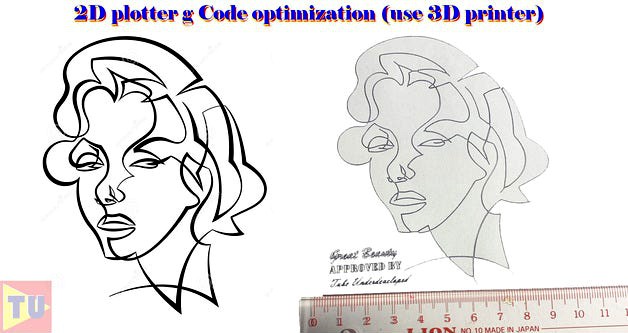
Change the 3D printer to a 2D plotter or handwriting machine is not a new topic. I have made a simple hardware upgrade to the 3D printer that change it to be a 2D plotter. I have tried to print the spaceship blueprint that downloads from the Internet. The g Code file is transferred using Illustrator and the g Code script. Then modify for 3D printing. It looks quite good. I am learning g Code now. Today I change the g Code head part for more convenient use. Also, the end part has been modified as well.
Below is the g code head and ending part.
G90 ;Set all axes to absolute
G21 ;Set units to millimeters
G28 X Y F5000 ; Home XY
G28 Z F2000 ; Home Z
G0 X0 Y0 Z13.5 ;Set pen printing height + 0.5mm
M300 S440 S3 ; Play a beep at 440Hz frequency for 3 second
G4 S10 ; Dwell for 10 second (Set up your pen)
G0 X100 ; Draw a line for test
G0 Z15 ; Level up pen, height when moving
G4 S3 ; Remove dammy paper
; End of head
; Start ending
M18 ; Disable Stepper motor, Ending
G0 Z15 ; Level up pen, height when moving
G0 Z15 ; Level up pen, height when moving
G28 X Y F5000 ; Home XY
M300 S440 S3 ; Play a beep at 440Hz frequency for 3 second
;Finish
I am still learning g code. If you have some advice please let me know. Thanks a lot.
Have fun with 2D printing.
Change the 3D printer to a 2D plotter or handwriting machine is not a new topic. I have made a simple hardware upgrade to the 3D printer that change it to be a 2D plotter. I have tried to print the spaceship blueprint that downloads from the Internet. The g Code file is transferred using Illustrator and the g Code script. Then modify for 3D printing. It looks quite good. I am learning g Code now. Today I change the g Code head part for more convenient use. Also, the end part has been modified as well.
Below is the g code head and ending part.
G90 ;Set all axes to absolute
G21 ;Set units to millimeters
G28 X Y F5000 ; Home XY
G28 Z F2000 ; Home Z
G0 X0 Y0 Z13.5 ;Set pen printing height + 0.5mm
M300 S440 S3 ; Play a beep at 440Hz frequency for 3 second
G4 S10 ; Dwell for 10 second (Set up your pen)
G0 X100 ; Draw a line for test
G0 Z15 ; Level up pen, height when moving
G4 S3 ; Remove dammy paper
; End of head
; Start ending
M18 ; Disable Stepper motor, Ending
G0 Z15 ; Level up pen, height when moving
G0 Z15 ; Level up pen, height when moving
G28 X Y F5000 ; Home XY
M300 S440 S3 ; Play a beep at 440Hz frequency for 3 second
;Finish
I am still learning g code. If you have some advice please let me know. Thanks a lot.
Have fun with 2D printing.