
Thingiverse
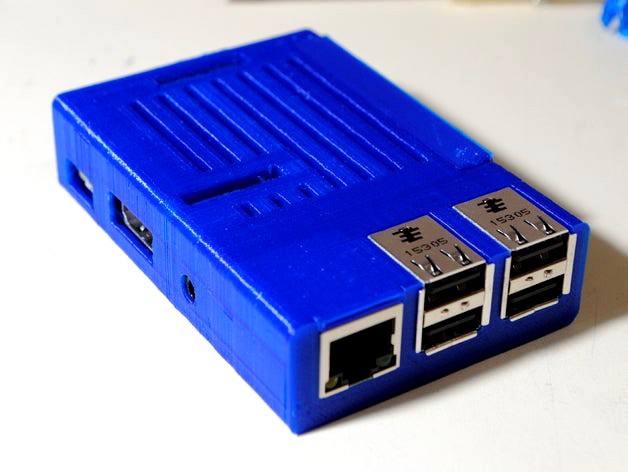
Full-Height Raspberry Pi Sleeve Case with CSI, DSI, & GPIO Holes by polysquare
by Thingiverse
Last crawled date: 4 years, 7 months ago
This is a remix of https://www.thingiverse.com/thing:1015706 to add holes for DSI, CSI, and GPIO connectors as well as to add some internal clearance to better fit Raspberry Pi 2's and 3's.
This case is "full-height" compared a "slim" case. The top of the case is flush with the the USB and Ethernet jacks.
There are two different files for the case:
CSI-DSI-GPIO_Pi_Sleeve_Case.stl is for the Pi 2B and older.
CSI-DSI-GPIO_Pi_Sleeve_Case_3B.stl is for the Pi 3B, 3B+, and newer. It has the LED holes on the opposite side and extra space for the POE header.
Note that this case is still friction fit, so you may have to use a bit of force to get your Pi inside. To get your Pi back out, you can push on the board through the holes that let the power and activity LEDs shine through.
Thanks to dktosoch for providing editable STEP files.
Onshape link (exportable): https://cad.onshape.com/documents/0527f85374c3470f163b524c/w/44ee3ce6fee61d0f2862f97d/e/0fcbe309e023cd8c8b6efd02
This case is "full-height" compared a "slim" case. The top of the case is flush with the the USB and Ethernet jacks.
There are two different files for the case:
CSI-DSI-GPIO_Pi_Sleeve_Case.stl is for the Pi 2B and older.
CSI-DSI-GPIO_Pi_Sleeve_Case_3B.stl is for the Pi 3B, 3B+, and newer. It has the LED holes on the opposite side and extra space for the POE header.
Note that this case is still friction fit, so you may have to use a bit of force to get your Pi inside. To get your Pi back out, you can push on the board through the holes that let the power and activity LEDs shine through.
Thanks to dktosoch for providing editable STEP files.
Onshape link (exportable): https://cad.onshape.com/documents/0527f85374c3470f163b524c/w/44ee3ce6fee61d0f2862f97d/e/0fcbe309e023cd8c8b6efd02