
Thingiverse
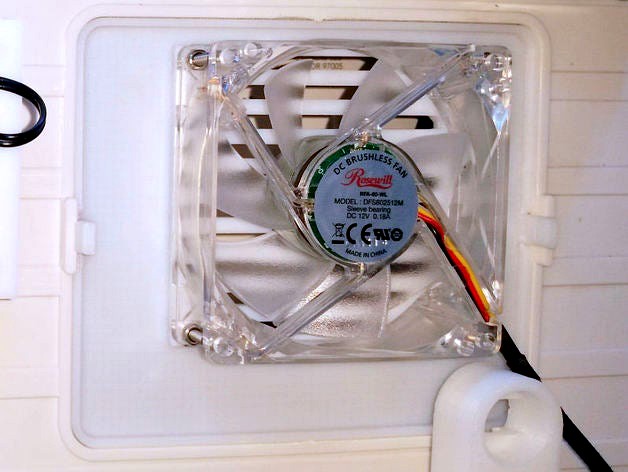
FlashForge Dreamer Side Panel Fan Mount by BaronWilliams
by Thingiverse
Last crawled date: 4 years, 7 months ago
FlashForge Dreamer Side Panel Fan Mount
The side panel fan mounts are designed to replace the Dreamer's snap in side panels allowing you to mount two 80x80x15mm fans on the left and right side of the Dreamer as I have done with my own Dreamer. It's possible these MIGHT fit the Dremel as well.
Two styles of fan mounts are included.
The flat side panel fan mount is designed for the left side. Because it's flat on the outside, it allows the printer to stand on it's left side wall when doing maintenance, which is something I do often.
The outset side panel fan mount is typically mounted on the right side, giving better clearance for the internal parts. I don't put this on the left side because I usually lay my printer on it's left side when doing maintenance. It's not good to stand the printer on it's left side to do maintenance if using the outset side panel, because the outset panel will break.
Note: the photos are outdated, showing my older design.
The wiring diagram shows how I wired up my 4 extra fans using a step down converter, a thermostat, and a switch to override the thermostat (see the FlashForge Dreamer Thermostat Mount for details).
See Also
FlashForge Dreamer Thermostat Mount found here: http://www.thingiverse.com/thing:682667
FlashForge Dreamer Short Fan Filament Guide Clip found here:http://www.thingiverse.com/thing:667620
The side panel fan mounts are designed to replace the Dreamer's snap in side panels allowing you to mount two 80x80x15mm fans on the left and right side of the Dreamer as I have done with my own Dreamer. It's possible these MIGHT fit the Dremel as well.
Two styles of fan mounts are included.
The flat side panel fan mount is designed for the left side. Because it's flat on the outside, it allows the printer to stand on it's left side wall when doing maintenance, which is something I do often.
The outset side panel fan mount is typically mounted on the right side, giving better clearance for the internal parts. I don't put this on the left side because I usually lay my printer on it's left side when doing maintenance. It's not good to stand the printer on it's left side to do maintenance if using the outset side panel, because the outset panel will break.
Note: the photos are outdated, showing my older design.
The wiring diagram shows how I wired up my 4 extra fans using a step down converter, a thermostat, and a switch to override the thermostat (see the FlashForge Dreamer Thermostat Mount for details).
See Also
FlashForge Dreamer Thermostat Mount found here: http://www.thingiverse.com/thing:682667
FlashForge Dreamer Short Fan Filament Guide Clip found here:http://www.thingiverse.com/thing:667620