
Thingiverse
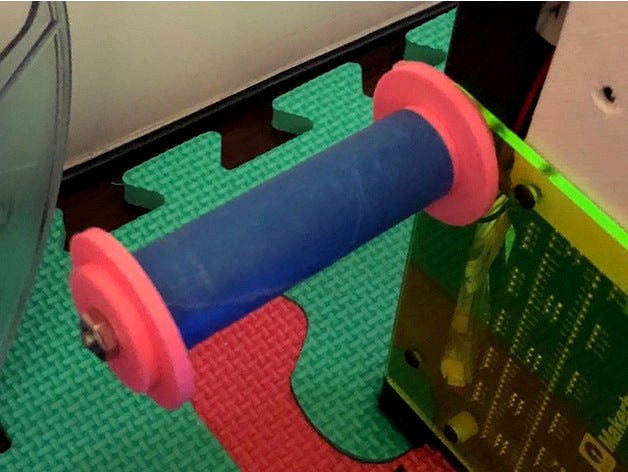
Filament holder with bearing for Flying Bear P905 by locnhinho
by Thingiverse
Last crawled date: 4 years, 7 months ago
Filament roller holder with pitch bearing 9x17x4mm. With this, almost no friction as compare to the original metal hanger. You need to print two inner and two outer mounts.
Require these additional hardware:
One 1/8" threaded rod (need to cut to proper length)
Two 1/8 nuts
To assemble:
Measure the current length and cut the 1/8" threaded rod accordingly.
Slide two bearing into the inner mount. One on each end.
Slide the outer mount into the inner mount with bearing in between.
Repeat for the other set.
Slide the 1/8 threaded rod through both. Make sure the larger end position at the opposite end.
Thread the nut on one end.
Wrap the outer mount with some blue painter tape. Otherwise, the filament roll don't grip the mount.
Mount it to the printer frame.
Note: I moved the mount position down quite a bit from the original mount position. You have to drill a new hole. This will allow you to add an out of filament sensor switch. For this, just go to ebay and buy an end stop filament sensor type (see picture). To mount the filament sensor, just zip tie the wire to the printer frame and let it hangs loosely. Otherwise, too much friction.
Update:
After install a new roll of filament, the filament seems to wrap around the spooler. Therefore, place a folder plastic bag under see the spooler. See picture above.
Require these additional hardware:
One 1/8" threaded rod (need to cut to proper length)
Two 1/8 nuts
To assemble:
Measure the current length and cut the 1/8" threaded rod accordingly.
Slide two bearing into the inner mount. One on each end.
Slide the outer mount into the inner mount with bearing in between.
Repeat for the other set.
Slide the 1/8 threaded rod through both. Make sure the larger end position at the opposite end.
Thread the nut on one end.
Wrap the outer mount with some blue painter tape. Otherwise, the filament roll don't grip the mount.
Mount it to the printer frame.
Note: I moved the mount position down quite a bit from the original mount position. You have to drill a new hole. This will allow you to add an out of filament sensor switch. For this, just go to ebay and buy an end stop filament sensor type (see picture). To mount the filament sensor, just zip tie the wire to the printer frame and let it hangs loosely. Otherwise, too much friction.
Update:
After install a new roll of filament, the filament seems to wrap around the spooler. Therefore, place a folder plastic bag under see the spooler. See picture above.