
Thingiverse
Ekobots - Ciclop 3D Scanner shield for Arduino. by jsirgado
by Thingiverse
Last crawled date: 4 years, 7 months ago
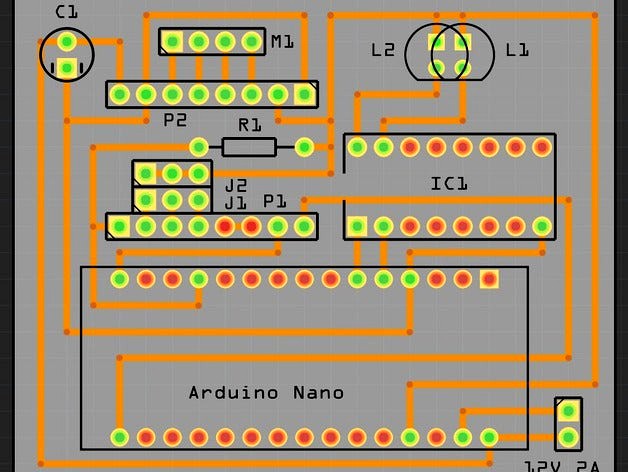
Ciclop 3D Scanner shield for Arduino.
2 Versions, choose the best for you:
Arduino Uno;
Arduino Nano;
For use with objects:
The Cliclop 3D Scanner by bqLabs:http://www.thingiverse.com/thing:740357
Ekobots - Beholder 3D Scanner.http://www.thingiverse.com/thing:1161366
Information and manuals:http://www.bq.com/gb/support/ciclop
Firmware:http://github.com/bqlabs/horus-fw
Software:http://github.com/bqlabs/horus
Observations:
The Arduino Uno version is a simple derivation of:http://www.thingiverse.com/thing:771552
I just removed the bridge, all on board, no wires.
The Arduino Nano version is the same schematic.
Just use sockets for the Arduino Nano and the Pololu Drive.
Thanks Jesse_Blue.
Attention:
Print the arduino uno shield at 33% of .PDF original size.
It is 68.6mm x 53.3mm and the pins distance is 2.54mm.
Print the arduino nano shield at 28% of the .PDF original size.
It is just, 43.18mm x 15.24 and the pins distance is 2.54mm.
Print a scratch in normal paper and put the arduino board over it to verify the pins alignment.
I do not know why the Fritzing create the .PDF with different aspect ratio.
All you need:
1x 10K ohms resistor;
1x 100uF 50V capacitor;
1x ULN2003 CI;
1x Breadboard;
Lots of male pines for breadboard;
Lots of female headers for breadboard;
1x Arduino board (Uno or Nano);
1x Pololu motor driver;
3x Jumper for pololu driver microstep setup.
If you are making the Arduino Nano version:
1x female connector for power supply 12v 2a;
If your Arduino use the chip CH340/CH341 for serial communication,
see the last images to configure the Horus 3D scanner software.File: "C:\Program Files\Horus\src\horus\gui\main.py"
That is all.
2 Versions, choose the best for you:
Arduino Uno;
Arduino Nano;
For use with objects:
The Cliclop 3D Scanner by bqLabs:http://www.thingiverse.com/thing:740357
Ekobots - Beholder 3D Scanner.http://www.thingiverse.com/thing:1161366
Information and manuals:http://www.bq.com/gb/support/ciclop
Firmware:http://github.com/bqlabs/horus-fw
Software:http://github.com/bqlabs/horus
Observations:
The Arduino Uno version is a simple derivation of:http://www.thingiverse.com/thing:771552
I just removed the bridge, all on board, no wires.
The Arduino Nano version is the same schematic.
Just use sockets for the Arduino Nano and the Pololu Drive.
Thanks Jesse_Blue.
Attention:
Print the arduino uno shield at 33% of .PDF original size.
It is 68.6mm x 53.3mm and the pins distance is 2.54mm.
Print the arduino nano shield at 28% of the .PDF original size.
It is just, 43.18mm x 15.24 and the pins distance is 2.54mm.
Print a scratch in normal paper and put the arduino board over it to verify the pins alignment.
I do not know why the Fritzing create the .PDF with different aspect ratio.
All you need:
1x 10K ohms resistor;
1x 100uF 50V capacitor;
1x ULN2003 CI;
1x Breadboard;
Lots of male pines for breadboard;
Lots of female headers for breadboard;
1x Arduino board (Uno or Nano);
1x Pololu motor driver;
3x Jumper for pololu driver microstep setup.
If you are making the Arduino Nano version:
1x female connector for power supply 12v 2a;
If your Arduino use the chip CH340/CH341 for serial communication,
see the last images to configure the Horus 3D scanner software.File: "C:\Program Files\Horus\src\horus\gui\main.py"
That is all.