
Thingiverse
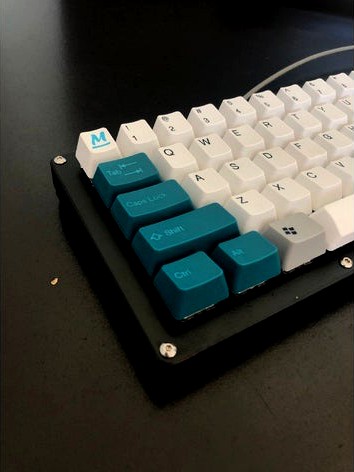
Custom 68-Key Mechanical Keyboard Case by JustinK
by Thingiverse
Last crawled date: 4 years, 8 months ago
A 3 part case for a custom 68-key mechanical keyboard. The switch plate is compatable with MX type switches and should be the right thickness to allow the switches to clip.
I have a CR-10 Mini, so the full case would not fit on the build plate, so I had to split each model into two halves, which I friction welded together, but could probably be super glued together if needed.
This was originally for my own keyboard project based on this build: 68keys.io
My reddit post on the board is here: https://www.reddit.com/r/MechanicalKeyboards/comments/91mxpn/finally_posting_it_my_custom_68_key_board_with_3d/
More pictures of my finished board can be found here: https://imgur.com/a/spoQKb7
It uses the mf68 pcb which can be found
here: https://spacecat.design/products/mf68-v1-1-pcb
and here (out of stock at time of posting): https://spacecat.design/products/mf68-v1-1-pcb
It was originally designed by dioib, I believe.
It has a QMK preset for firmware here: https://config.qmk.fm/#/mf68/LAYOUT (the layout itself is blank, but that's easy to fill in)
If you are a beginner on windows, just save yourself the hassle of compiling with code and use the gui linked above. I also recommend this tutorial here for flashing the Arduino Pro Micro controller. https://www.youtube.com/watch?v=_-L0EsyLXio
I have a CR-10 Mini, so the full case would not fit on the build plate, so I had to split each model into two halves, which I friction welded together, but could probably be super glued together if needed.
This was originally for my own keyboard project based on this build: 68keys.io
My reddit post on the board is here: https://www.reddit.com/r/MechanicalKeyboards/comments/91mxpn/finally_posting_it_my_custom_68_key_board_with_3d/
More pictures of my finished board can be found here: https://imgur.com/a/spoQKb7
It uses the mf68 pcb which can be found
here: https://spacecat.design/products/mf68-v1-1-pcb
and here (out of stock at time of posting): https://spacecat.design/products/mf68-v1-1-pcb
It was originally designed by dioib, I believe.
It has a QMK preset for firmware here: https://config.qmk.fm/#/mf68/LAYOUT (the layout itself is blank, but that's easy to fill in)
If you are a beginner on windows, just save yourself the hassle of compiling with code and use the gui linked above. I also recommend this tutorial here for flashing the Arduino Pro Micro controller. https://www.youtube.com/watch?v=_-L0EsyLXio