
Thingiverse
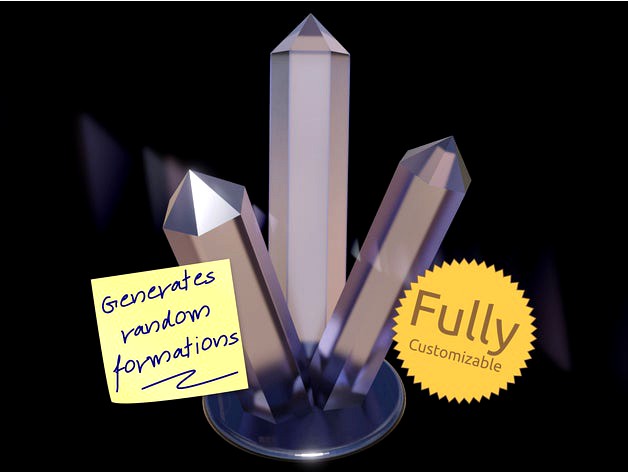
Crystal Generator by Code_and_Make
by Thingiverse
Last crawled date: 4 years, 7 months ago
Generate unique, ornamental crystal formations with our latest, free, 3D printable design.
This customizable design allows you to choose the number of shards, the number of sides each shard has, their length, diameter, tilt and offset. Then you can specify how much randomness to apply to generate unique crystal structures.
This design is completely free and shared under a permissive license. Your support is hugely appreciated.
Did you know?
Some of our designs cannot be found on Thingiverse. If you are looking for more, check out our premium projects:
https://codeandmake.com/premium
OpenSCAD Customizer Options
We recommend you use OpenSCAD to customize this design.
As you adjust the Customizer options, OpenSCAD will generate new formations. To preview a new formation using the same Customizer settings, simply press F5. When you are happy, press F6 to render a crystal with your chosen Customizer settings. You may need to press F6 a few times but, as this design uses a low polygon count, each render should be quick.
This design has the following Customizer options:
Shards
Number_of_Shards - Number of crystal shards
Shard_Sides - Number of sides each crystal shard has
Shard_Length - Length of each crystal shard
Shard_Diameter - Diameter of each crystal shard
Shard_Tilt - Amount of tilt applied to each crystal shard
Shard_Offset - Amount to offset each crystal shard from the center
Variation
Shard_Length_Variance_Percentage - Amount of random variance to apply to the length
Shard_Diameter_Variance_Percentage - Amount of random variance to apply to the diameter
Shard_Tilt_Variance_Percentage - Amount of random variance to apply to the tilt
Shard_Offset_Variance_Percentage - Amount of random variance to apply to the offset
Shard_Spacing_Variance_Percentage - Amount of random variance to apply to the spacing
Hollow
Hollow_Shards - Should the shards be hollow?
Hollow_Base - Should the base also be hollow? Only valid if 'Hollow_Shards' is set to 'Yes'
Hollow_Shard_Wall_Thickness - Wall thickness of hollow shards
Base
Base_Type - Type of base
Base_Thickness - Thickness of the base
Design Considerations
Consider printing this in a translucent or glow-in-the dark filament or resin and possibly adding some under-lighting, using something like a NeoPixel Ring.
As of v1.1, you can generate hollow formations, allowing for improved lighting effects. For example, you could insert LEDs into some of the shards or use our illuminating base to create a desk lamp. See: https://www.thingiverse.com/thing:4850163
Material
This design is perfect for printing in most filaments, but we recommend translucent filaments/resins in particular for this design.
Versions
1.1 (1 May 2021)
Added support for hollow formations (Hollow_Shards, Hollow_Base and Hollow_Shard_Wall_Thickness)
Renamed Customizer options (Crystal_* > Shard_*)
Fixed spacing variance bug
1.0 (28 Apr 2021) - Initial version
Printing
Recommended slicer settings:
Resolution: 0.1mm - 0.2mm
Infill: ~10 - 20% recommended.
For solid formations:
Supports: Should not be required.
Rafts: Not required, unless you experience adhesion issues.
For hollow formations:
Supports: Should not be required for the outsides of the shards, but some hollow formations may require internal supports. We recommending using buildplate supports. In Cura set 'Support Placement' to 'Touching Buildplate'.
Rafts: We recommend printing with an internal brim for the support material. In Cura disable the 'Brim Only on Outside' setting.
License
The "Crystal Generator" models (.stl) are licensed under the CC BY license by Code and Make.
The "Crystal Generator" code (.scad) is licensed under The MIT License by Code and Make.
Note: 'BSD' license has been selected as it is the closest available option in the list.
We are proud to offer content to you absolutely free.
We love to create free content for you. As you might imagine, it takes a lot of time. Supporters help us fund materials and equipment to create future projects and tutorials. To show your appreciation, please use the link below:
https://codeandmake.com/support
We thank you so much for your support!
This customizable design allows you to choose the number of shards, the number of sides each shard has, their length, diameter, tilt and offset. Then you can specify how much randomness to apply to generate unique crystal structures.
This design is completely free and shared under a permissive license. Your support is hugely appreciated.
Did you know?
Some of our designs cannot be found on Thingiverse. If you are looking for more, check out our premium projects:
https://codeandmake.com/premium
OpenSCAD Customizer Options
We recommend you use OpenSCAD to customize this design.
As you adjust the Customizer options, OpenSCAD will generate new formations. To preview a new formation using the same Customizer settings, simply press F5. When you are happy, press F6 to render a crystal with your chosen Customizer settings. You may need to press F6 a few times but, as this design uses a low polygon count, each render should be quick.
This design has the following Customizer options:
Shards
Number_of_Shards - Number of crystal shards
Shard_Sides - Number of sides each crystal shard has
Shard_Length - Length of each crystal shard
Shard_Diameter - Diameter of each crystal shard
Shard_Tilt - Amount of tilt applied to each crystal shard
Shard_Offset - Amount to offset each crystal shard from the center
Variation
Shard_Length_Variance_Percentage - Amount of random variance to apply to the length
Shard_Diameter_Variance_Percentage - Amount of random variance to apply to the diameter
Shard_Tilt_Variance_Percentage - Amount of random variance to apply to the tilt
Shard_Offset_Variance_Percentage - Amount of random variance to apply to the offset
Shard_Spacing_Variance_Percentage - Amount of random variance to apply to the spacing
Hollow
Hollow_Shards - Should the shards be hollow?
Hollow_Base - Should the base also be hollow? Only valid if 'Hollow_Shards' is set to 'Yes'
Hollow_Shard_Wall_Thickness - Wall thickness of hollow shards
Base
Base_Type - Type of base
Base_Thickness - Thickness of the base
Design Considerations
Consider printing this in a translucent or glow-in-the dark filament or resin and possibly adding some under-lighting, using something like a NeoPixel Ring.
As of v1.1, you can generate hollow formations, allowing for improved lighting effects. For example, you could insert LEDs into some of the shards or use our illuminating base to create a desk lamp. See: https://www.thingiverse.com/thing:4850163
Material
This design is perfect for printing in most filaments, but we recommend translucent filaments/resins in particular for this design.
Versions
1.1 (1 May 2021)
Added support for hollow formations (Hollow_Shards, Hollow_Base and Hollow_Shard_Wall_Thickness)
Renamed Customizer options (Crystal_* > Shard_*)
Fixed spacing variance bug
1.0 (28 Apr 2021) - Initial version
Printing
Recommended slicer settings:
Resolution: 0.1mm - 0.2mm
Infill: ~10 - 20% recommended.
For solid formations:
Supports: Should not be required.
Rafts: Not required, unless you experience adhesion issues.
For hollow formations:
Supports: Should not be required for the outsides of the shards, but some hollow formations may require internal supports. We recommending using buildplate supports. In Cura set 'Support Placement' to 'Touching Buildplate'.
Rafts: We recommend printing with an internal brim for the support material. In Cura disable the 'Brim Only on Outside' setting.
License
The "Crystal Generator" models (.stl) are licensed under the CC BY license by Code and Make.
The "Crystal Generator" code (.scad) is licensed under The MIT License by Code and Make.
Note: 'BSD' license has been selected as it is the closest available option in the list.
We are proud to offer content to you absolutely free.
We love to create free content for you. As you might imagine, it takes a lot of time. Supporters help us fund materials and equipment to create future projects and tutorials. To show your appreciation, please use the link below:
https://codeandmake.com/support
We thank you so much for your support!