
Blend Swap
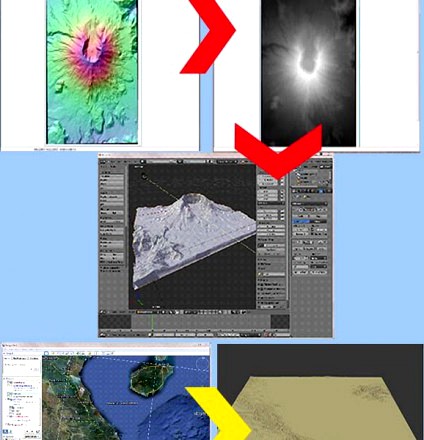
Create Terrain From Digital Elevation
by Blend Swap
Last crawled date: 8 years, 8 months ago
This is a tutorial that will teach you how to create Blender terrain models from digital elevation data downloaded from the Internet.The URLs to download the free software is included in the tutorial. The software you will need is:MicroDEM: This free application loads digital elevation data and converts it a gray scale heightmap to be used as the texture in Blender for the displacement modifier. You need this application to complete the tutorial.GoogleEarth and the srtm41.kmz file: This is optional, but I cover how to use it in the tutorial. This allows you to download the elevation data collected by the Shuttle Radar Topography Mission (SRTM) worldwide. Although it is low resolution data, I find it very useful.I use actual digital elevation data to create Blender terrains for mountains, volcanos, canyons, deserts, river valleys, beaches, coves, battlefields and other historic palces, and many other uses. ANT is a very good tool in Blender and I use it. However, when you want to create specific terrain models or ones with high resolution without a lot of effort, then digital elevation data is what I prefer.Using GIMP, Photoshop, or other imaging software, you can, with some practice, edit the heightmaps to add, modify, and delete terrain to meet your needs. Also, you can paint in flat areas to create roads, paths, streams, rivers, etc. But it does take some practice to select the proper gray scales for the desired terrain features.The tutorial will take you step by step from downloading the elevation data for Mount Saint Helens in Washington State, to loading the data in MicroDEM, converting it to a heightmap, and then using that heightmap in Blender to create a model of Mt. St. Helens.The preview to the left shows two techniques covered in the tutorial.The first technique is represented by the red arrows and uses elevation data downloaded from the Internet. In the upper left is the elevation data opened in MicroDEM. The red arrow points to the image on the right that is the data converted to a gray scale heightmap. The red arrow pointing down from the heightmap shows the result you will get in Blender.The second technique is represented by the yellow arrow in the preview to the left. Using GoogleEarth with the srtm41.kmz file installed select the area to be modeled and download the srtm data directly from GoogleEarth. After processing in MicroDEM, the yellow arrow points to the Blender terrain model of that same area in GoogleEarth.If you know how to use the displacement modifier, then once you download the digital elevation data file, it will take no more than 5-10 minutes to create a detailed terrain model of actual terrain. If you are new to Blender, then it might take a little longer.As noted, the software needed is free.There are four easy steps:Download the digital elevation data file either directly from the Internet or via GoogleEarth.Open the file in the MicroDEM software application.Convert the data to a gray scale heightmap and save it as a GeoTiff file.Use the GeoTiff file as the texture image in Blender for use in the displace modifier.Additionally, I show you how to download elevation terrain data for most of the world using GoogleEarth and give you an example of what it will look like in Blender.GoogleEarth is free and the kmz file that provides access to the SRTM (Shuttle Radar Topography Mission) elevation data is also free and is a no-brainer to install.Itâs simple, itâs easy, and itâs all free.Once you have the software installed (the GoogleEarth technique is optional), the tutorial shouldnât take more than about 20 minutes from downloading the data file to producing the Blender model. Once youâve done it two or three times, Iâd be surprised if it took you more than 5-10 minutes after you downloaded your elevation data.And note that MicroDEM will allow you to merge multiple elevation data files (of the same format) to create terrain models of larger areas.