
Thingiverse
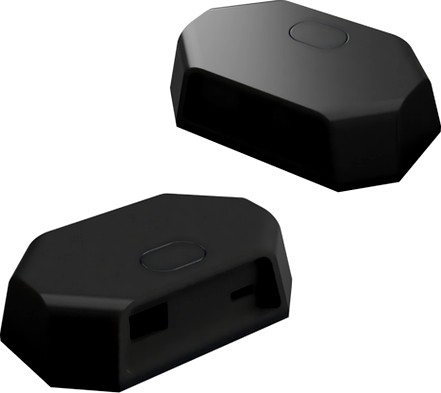
Corsair LS100 by benoit0727
by Thingiverse
Last crawled date: 4 years, 10 months ago
English version :
Reproduction of the Corsair LS100 box, compatible icue with an arduino pro micro.
You will need :
3 pin female rgb ws2812b connector
DC jack connector 5.5 x 2.1
an arduino micro pro
push button https://www.amazon.fr/RUNCCI-YUN-momentan%C3%A9-tactile-Interrupteur-capuchon/dp/B07WPBQXJ9
For the programming of the arduino, I invite you to consult the GitHub page of Legion2 which did an excellent job:https://github.com/Legion2/CorsairLightingProtocol
Tutorial for arduino installation (in french by GENERATION2GEEK) : https://www.youtube.com/watch?v=eFyOnOck-04&lc
Version française :
Reproduction du boitier Corsair LS100, compatible avec le logiciel icue avec un arduino micro pro
Vous aurez besoin :
Deux connecteur 3 pin femelle pour bande RGB ws2812b
Un connecteur DC Jack dimension 5.5x2.1
Un arduino micro pro
Un bouton poussoir (je l'ai designé avec ce genre de bouton : https://www.amazon.fr/RUNCCI-YUN-momentan%C3%A9-tactile-Interrupteur-capuchon/dp/B07WPBQXJ9)
Pour la programmation de l'arduino, je vous invite à consulter la page Github de Legion2 le créateur du programme : https://github.com/Legion2/CorsairLightingProtocol
Un tutoriel vidéo de la programmation de l'arduino est disponible sur youtube par GENERATION2GEEK : https://www.youtube.com/watch?v=eFyOnOck-04&lc
Reproduction of the Corsair LS100 box, compatible icue with an arduino pro micro.
You will need :
3 pin female rgb ws2812b connector
DC jack connector 5.5 x 2.1
an arduino micro pro
push button https://www.amazon.fr/RUNCCI-YUN-momentan%C3%A9-tactile-Interrupteur-capuchon/dp/B07WPBQXJ9
For the programming of the arduino, I invite you to consult the GitHub page of Legion2 which did an excellent job:https://github.com/Legion2/CorsairLightingProtocol
Tutorial for arduino installation (in french by GENERATION2GEEK) : https://www.youtube.com/watch?v=eFyOnOck-04&lc
Version française :
Reproduction du boitier Corsair LS100, compatible avec le logiciel icue avec un arduino micro pro
Vous aurez besoin :
Deux connecteur 3 pin femelle pour bande RGB ws2812b
Un connecteur DC Jack dimension 5.5x2.1
Un arduino micro pro
Un bouton poussoir (je l'ai designé avec ce genre de bouton : https://www.amazon.fr/RUNCCI-YUN-momentan%C3%A9-tactile-Interrupteur-capuchon/dp/B07WPBQXJ9)
Pour la programmation de l'arduino, je vous invite à consulter la page Github de Legion2 le créateur du programme : https://github.com/Legion2/CorsairLightingProtocol
Un tutoriel vidéo de la programmation de l'arduino est disponible sur youtube par GENERATION2GEEK : https://www.youtube.com/watch?v=eFyOnOck-04&lc