
CG Trader
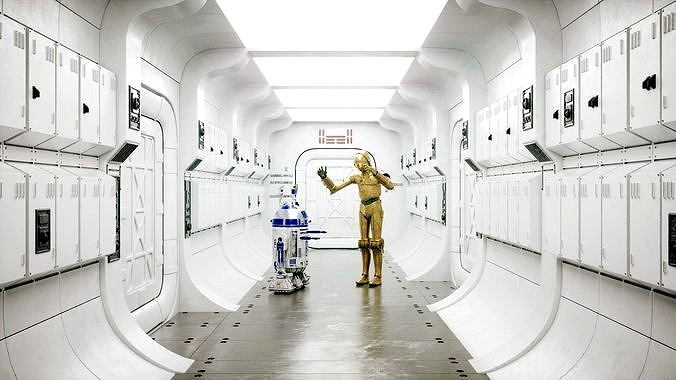
Corridor Interior Scene
by CG Trader
Last crawled date: 4 years ago
Hello. AI Lights&AI denoiser Settings. Two LWS Scene: LightWave 2018 + Octane 3 Settings. LightWave 2018 + Octane 4 Settings.
-AI Lights Settings
-AI Denoiser Settings 3D Scene done in LightWave 2018.
All Settings ready for LightWave and Octane 3 and 4.
You must Have got Octane to render this image. What is included? -Scene setup
-Light Setup
-Camera Setup
-Octane Render Setup
-Materials Setup
-Nodes Setup
-Rendering Nodes Setup for Octane
-Render Full Path Tracing! Advanced Settings: -Curve Color Gamma Lut
-Reinhard Style +Mix Expo+Gamma Set
-Color Correction
-Color Balance
-Custom LUT Settings
-Imager Settings
-Setting for 100 % Noise Free All 3D Models done only with Quads. In Layout You can change settings in Subdivision Level to have full control how much details You needed. For Example from 0 to 3 Corridor Full Control polygon Count. Only Change numbers of Bounce in Octane Render Nodes. Textures in 4K.
All Elements on scene have got UV's Non-Overlapping!
UV's with different names. Formats: LWO+LWS (2018)
OBJ+MTL (2018)
FBX two version (2016+2018) Version of LW used: LightWave 2018 and 2019
Octane Render 3.08.07
Octane Render 4
Octane Render 2018 Best regards.
Adrian Kulawik corridor interior sci fi design space robot star wars c3po r2d2 astronomy jedi vader futuristic spacecraft lightsaber planet character fantasy fantasy character futuristic interior character design fantasy character futuristic interior interior design interior space robot character robot design sci fi star wars
-AI Lights Settings
-AI Denoiser Settings 3D Scene done in LightWave 2018.
All Settings ready for LightWave and Octane 3 and 4.
You must Have got Octane to render this image. What is included? -Scene setup
-Light Setup
-Camera Setup
-Octane Render Setup
-Materials Setup
-Nodes Setup
-Rendering Nodes Setup for Octane
-Render Full Path Tracing! Advanced Settings: -Curve Color Gamma Lut
-Reinhard Style +Mix Expo+Gamma Set
-Color Correction
-Color Balance
-Custom LUT Settings
-Imager Settings
-Setting for 100 % Noise Free All 3D Models done only with Quads. In Layout You can change settings in Subdivision Level to have full control how much details You needed. For Example from 0 to 3 Corridor Full Control polygon Count. Only Change numbers of Bounce in Octane Render Nodes. Textures in 4K.
All Elements on scene have got UV's Non-Overlapping!
UV's with different names. Formats: LWO+LWS (2018)
OBJ+MTL (2018)
FBX two version (2016+2018) Version of LW used: LightWave 2018 and 2019
Octane Render 3.08.07
Octane Render 4
Octane Render 2018 Best regards.
Adrian Kulawik corridor interior sci fi design space robot star wars c3po r2d2 astronomy jedi vader futuristic spacecraft lightsaber planet character fantasy fantasy character futuristic interior character design fantasy character futuristic interior interior design interior space robot character robot design sci fi star wars