
Blend Swap
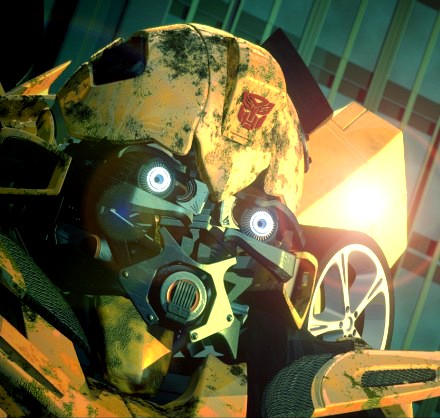
Bumblebee
by Blend Swap
Last crawled date: 9 years, 4 months ago
Bumblebee!Made and Rendered in Blender 2.59I tried recreating Bumblebee from the Transformers movie sequel. This by far the most complex scene I have made in Blender. It took me about 5 months, literally, to pull this off. I have never worked on it more than an hour in a day though. The biggest challenge was modeling without proper reference images. Iâve browsed several sites looking for proper reference images but failed. So I decided to use snapshots from the actual movie. I sketched out each piece at a time and I went to modeling. I mostly used box-modeling technique.Lighting was pretty straight forward I used a Sun lamp as a key and fill, and also an Area rim light. I added AO and Environmental Lighting but I didnât use it for the final render (above).Material nodes were helpful in bring up some saturation. All the texturing was done with procedural textures except one scratch map from CGtextures (MetalScratches0037_2_S.jpg), which the scene will still look good without.Rendering (with Blender Internal) took 11 mins. on my 4.3 Ghz laptop. I used the compositor for some Color grading, DOF, and a little glow. Then I switched to GIMP and adjusted some curves, added more Color grading, and a cute lens flare to top it all off. I also flipped the image horizontally for no apparent reason (so the blend file is horizontally the opposite of the image above).I hope this will be a great resource for those of you who like âreverse engineeringâ.Enjoy!Keep your comments as harsh as possible. Donât worry about hurting my feelings. ;-)