
Thingiverse
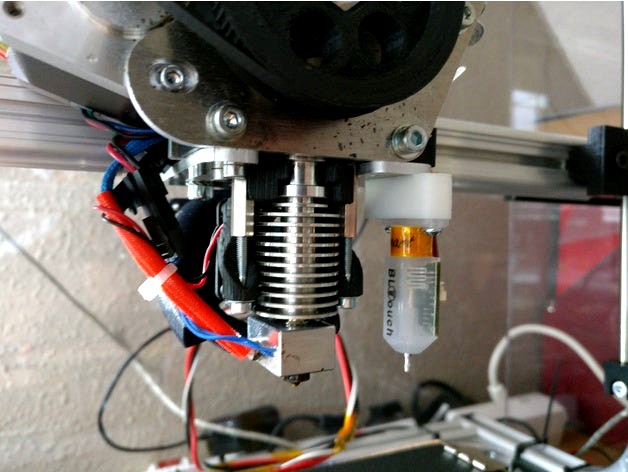
BLTOUCH mount for Velleman K8200 (Auto Bed Leveling) by pgote
by Thingiverse
Last crawled date: 4 years, 7 months ago
A BLTOUCH (June 2017 Smart version) mount for my K8200 printer for enabling auto bed leveling feature. It is 16mm from my E3d v6 hotend (min 15mm).
The first version that I designed came a bit too far from the hotend and I was also using the springs that comes with the BLTOUCH but post testing I redesigned it to be more stable and I sanded down the height of the part to exact 11.3 mm so I don't need the springs.
Offset of the probe is now 29 mm to the right and 8mm to the front of the hotend.
My K8200 Marlin 1.1.4 mod is found here: https://github.com/nidayand/k8200-marlin
Calibration process that I'm using:
Make sure that hotend is heated so that possible metal expansion is included in calculations
Then I'm doing the following..
M851 Z0 - Reset offset value
M500 - Save
G28 - Home all axis
M114 - Note the Z height (is not necessarily 0) - lets call this {H1} height
G92 Z10 - Tricking printer in order to go below Z0 in calibration
G1 X100 Y100 - Go to center position of the bed where the probe was (in my case X100 Y100 as I have a 200mm bed)
Go down with Z until appropriate height from the bed
M114 - get the current position of Z. Call this {H2}
Subtract distance 10 - {H1} - {H2}. This is the offset value. E.g. -0.85
M851 Z-0.85 - Define the offset in EEPROM
M500 - Save
Verify... (G28, G1 Z0, measure)
The first version that I designed came a bit too far from the hotend and I was also using the springs that comes with the BLTOUCH but post testing I redesigned it to be more stable and I sanded down the height of the part to exact 11.3 mm so I don't need the springs.
Offset of the probe is now 29 mm to the right and 8mm to the front of the hotend.
My K8200 Marlin 1.1.4 mod is found here: https://github.com/nidayand/k8200-marlin
Calibration process that I'm using:
Make sure that hotend is heated so that possible metal expansion is included in calculations
Then I'm doing the following..
M851 Z0 - Reset offset value
M500 - Save
G28 - Home all axis
M114 - Note the Z height (is not necessarily 0) - lets call this {H1} height
G92 Z10 - Tricking printer in order to go below Z0 in calibration
G1 X100 Y100 - Go to center position of the bed where the probe was (in my case X100 Y100 as I have a 200mm bed)
Go down with Z until appropriate height from the bed
M114 - get the current position of Z. Call this {H2}
Subtract distance 10 - {H1} - {H2}. This is the offset value. E.g. -0.85
M851 Z-0.85 - Define the offset in EEPROM
M500 - Save
Verify... (G28, G1 Z0, measure)