
Thingiverse
Assistive Devices for PC Keyboard by Beatrice1975
by Thingiverse
Last crawled date: 4 years, 7 months ago
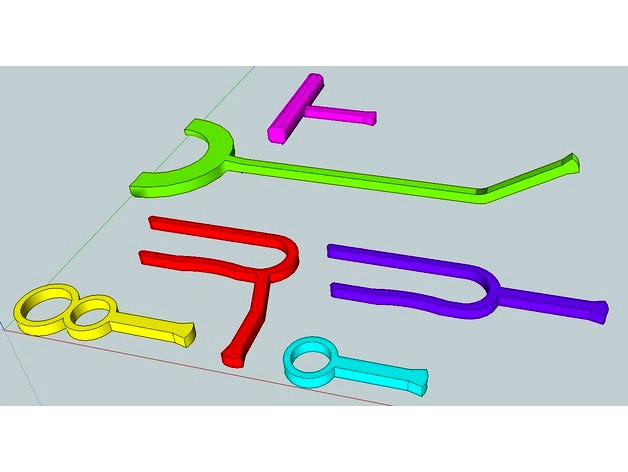
This is a collection of assisitive pieces expecially designed to use a computer keyboard. They have different shapes to conform different needs:
-Ring o (light blue), can be worn in the pinkie finger and allows some degree of the wrist without being heavy or cumbersome.
-Ring 8 (yellow), can be worn in the pinkie and ring finger with less degree of movement of the wrist, but maybe is a little more steady.
-T shape (purple) allows to push the keys with the palm of the hand facing down, with the clenched fist.
-C shape (red) also allows to keep the palm of the hand facing down, but the hand can stay open as the C embraces it.
-U shape (violet) is similar to C shape but the hand is kept perpendicular to the keyboard.
Mouth piece (green) this allows a person to use the mouth to tap on the keyboard. This piece needs the supporting material.
Finger key (forgot to put in the photo) is a wishbone shaped piece that can be grabbed by three fingers or phalanxes, and extends the lenght to better reach the keyboard.
-Ring o (light blue), can be worn in the pinkie finger and allows some degree of the wrist without being heavy or cumbersome.
-Ring 8 (yellow), can be worn in the pinkie and ring finger with less degree of movement of the wrist, but maybe is a little more steady.
-T shape (purple) allows to push the keys with the palm of the hand facing down, with the clenched fist.
-C shape (red) also allows to keep the palm of the hand facing down, but the hand can stay open as the C embraces it.
-U shape (violet) is similar to C shape but the hand is kept perpendicular to the keyboard.
Mouth piece (green) this allows a person to use the mouth to tap on the keyboard. This piece needs the supporting material.
Finger key (forgot to put in the photo) is a wishbone shaped piece that can be grabbed by three fingers or phalanxes, and extends the lenght to better reach the keyboard.