
Thingiverse
Anycubic I3 Mega WIFI mod!!! by andygi
by Thingiverse
Last crawled date: 4 years, 8 months ago
Hi, I'm investigating the Trigorilla-Pro ESP01 Port.
My printer have a v1.4.0RC23/P3 firmware,,,,
It port is for a ESP01 ESP8266 wifi module.
The Anycubic on Boot talk to wifi module whit AT commands at 115200bps, send a AT command to switch at 2.250.000Bps and open UDP server in port 3000.
This is a snif trafic on port, commands send from Printer.
Boot printer and it send at 115.200 bauds:
⸮⸮⸮⸮⸮⸮AT+UART_CUR=2250000,8,1,0,0
"?????" scrap data
AT+UART_CUR=2250000,8,1,0,0 Set a ESP8266 to change at 2.250.000 bps
Then at 2.250.000 bauds printer send:
AT+CIPSTART=4,"UDP","192.168.1.110",8080,3000,2
Set a ESP8266 a UDP server at port 3000 in muticonnection mode
IP 192.168.1.110 and port 8080 in UDP protocol are Irrelevant.
(command AT+CWMODE=1 not apears but is necessari send before to accept that command)
More thinks:
If I send via Cura console to printer some commands like:
Command via cura console:
M9005 '"ssid","password"'
And receive via ESP8266 port the string:
AT+CWSAP="ssid","password”,5,3
Means in AT command, put ESP8266 in mode AP with SSID=SSID and 3=WPA_TKIP password="password", 5=5 channel at 2,4Ghz.
Commnad via cura console:
M9003 '"ssid","password"'
And receive via ESP8266 port the string:
AT+CWJAP="ssid","password"
Means in AT command, put ESP8266 in Station mode and connect to wireless SSID=SSID and password="password"
Ok, go to make some probes.
I check the printer AT commands in ESP8266 module with AT firmwares and work fine.
Now, connect the ESP8266 to printer and it not work properly. I thint that some commands are needed to perfom setup operation correctly.
Workaround:
Program ESP8266 with Arduino IDE.
Simple program,
Puts a UART in 2.250.000dbs
Connects to my wirelees network in DHCP
Open TCP server at port 2000 (such a telnet server)
Create a trasparent bridge between Server <> UART
Results:
ESP8266 now ignoring the printer string or commands (fixed configuration no AT commands to execute *TO DO) and sent it to wireless connection.
Connect my PC to TCP 2000 port:
receibed some strings from boot time in console
Now I send some strings to tcp console in AT format commands and responses:
Send:
+IPD,4,3:M20
NOTE: +IPD,4,3: < is a AT command that indicates that he receibed in channel stream 4, 3 bytes with string "M30" (M30 command Marling is a list of SD files)
Reply:
Begin file list
ANYCUBIC 0=4,12
.Spotlight-V100 0
.fseventsd 0,14
Models 0ND=4,10
prova.gcode 615
AI3M_Print.gcode 4641914
End file list15
ok L:6SEND=4,8
Printer send me a SD file list.
ANYCUBIC < Name of SD
Models < Folder
*.gcode are gcode files, number indicates bytes of file
WOW it's working!!!
Some other commands.....
Send:
+IPD,4,4:M300
Reply:
ok N:0SEND=4,8
"Printer beeps"
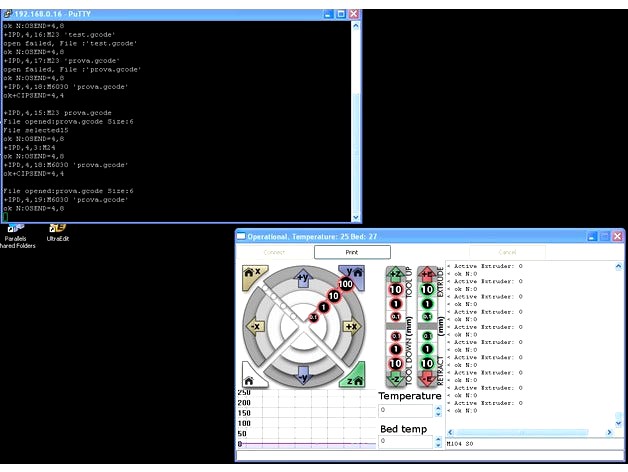
Now I send a printer to print a SD file.
Investigating google i found a M6030 command, open file and print it, check it:
Send:
+IPD,4,19:M6030 'prova.gcode'
Reply:
ok N:0SEND=4,8
prova.gcode file contais only 1 marlin command M300, printer open file and execute it, and printer beeps.
TO DO...
Take advantage of M9005 and M9003 commands
Implent rudimentary code to execute AT commands sended by M9005 and M9003 instructions, set wireles mode.
Printer haven't a wireless menu, but is simple to set it, create a text file with gcode commands M9003 o M9005 to set it.
Investigate to implment in ESP8266 optoprint protocol to make possible thtat CURA lint to ESP8266 su as a optoprint server.
That's all at the moment, avances
Please any information are well become, is you have any question please ask me.
Note: The English language is not my mother tongue, my English level is quite low
I speak Catalonian and Spanish lenguage.
My printer have a v1.4.0RC23/P3 firmware,,,,
It port is for a ESP01 ESP8266 wifi module.
The Anycubic on Boot talk to wifi module whit AT commands at 115200bps, send a AT command to switch at 2.250.000Bps and open UDP server in port 3000.
This is a snif trafic on port, commands send from Printer.
Boot printer and it send at 115.200 bauds:
⸮⸮⸮⸮⸮⸮AT+UART_CUR=2250000,8,1,0,0
"?????" scrap data
AT+UART_CUR=2250000,8,1,0,0 Set a ESP8266 to change at 2.250.000 bps
Then at 2.250.000 bauds printer send:
AT+CIPSTART=4,"UDP","192.168.1.110",8080,3000,2
Set a ESP8266 a UDP server at port 3000 in muticonnection mode
IP 192.168.1.110 and port 8080 in UDP protocol are Irrelevant.
(command AT+CWMODE=1 not apears but is necessari send before to accept that command)
More thinks:
If I send via Cura console to printer some commands like:
Command via cura console:
M9005 '"ssid","password"'
And receive via ESP8266 port the string:
AT+CWSAP="ssid","password”,5,3
Means in AT command, put ESP8266 in mode AP with SSID=SSID and 3=WPA_TKIP password="password", 5=5 channel at 2,4Ghz.
Commnad via cura console:
M9003 '"ssid","password"'
And receive via ESP8266 port the string:
AT+CWJAP="ssid","password"
Means in AT command, put ESP8266 in Station mode and connect to wireless SSID=SSID and password="password"
Ok, go to make some probes.
I check the printer AT commands in ESP8266 module with AT firmwares and work fine.
Now, connect the ESP8266 to printer and it not work properly. I thint that some commands are needed to perfom setup operation correctly.
Workaround:
Program ESP8266 with Arduino IDE.
Simple program,
Puts a UART in 2.250.000dbs
Connects to my wirelees network in DHCP
Open TCP server at port 2000 (such a telnet server)
Create a trasparent bridge between Server <> UART
Results:
ESP8266 now ignoring the printer string or commands (fixed configuration no AT commands to execute *TO DO) and sent it to wireless connection.
Connect my PC to TCP 2000 port:
receibed some strings from boot time in console
Now I send some strings to tcp console in AT format commands and responses:
Send:
+IPD,4,3:M20
NOTE: +IPD,4,3: < is a AT command that indicates that he receibed in channel stream 4, 3 bytes with string "M30" (M30 command Marling is a list of SD files)
Reply:
Begin file list
ANYCUBIC 0=4,12
.Spotlight-V100 0
.fseventsd 0,14
Models 0ND=4,10
prova.gcode 615
AI3M_Print.gcode 4641914
End file list15
ok L:6SEND=4,8
Printer send me a SD file list.
ANYCUBIC < Name of SD
Models < Folder
*.gcode are gcode files, number indicates bytes of file
WOW it's working!!!
Some other commands.....
Send:
+IPD,4,4:M300
Reply:
ok N:0SEND=4,8
"Printer beeps"
Now I send a printer to print a SD file.
Investigating google i found a M6030 command, open file and print it, check it:
Send:
+IPD,4,19:M6030 'prova.gcode'
Reply:
ok N:0SEND=4,8
prova.gcode file contais only 1 marlin command M300, printer open file and execute it, and printer beeps.
TO DO...
Take advantage of M9005 and M9003 commands
Implent rudimentary code to execute AT commands sended by M9005 and M9003 instructions, set wireles mode.
Printer haven't a wireless menu, but is simple to set it, create a text file with gcode commands M9003 o M9005 to set it.
Investigate to implment in ESP8266 optoprint protocol to make possible thtat CURA lint to ESP8266 su as a optoprint server.
That's all at the moment, avances
Please any information are well become, is you have any question please ask me.
Note: The English language is not my mother tongue, my English level is quite low
I speak Catalonian and Spanish lenguage.