
Thingiverse
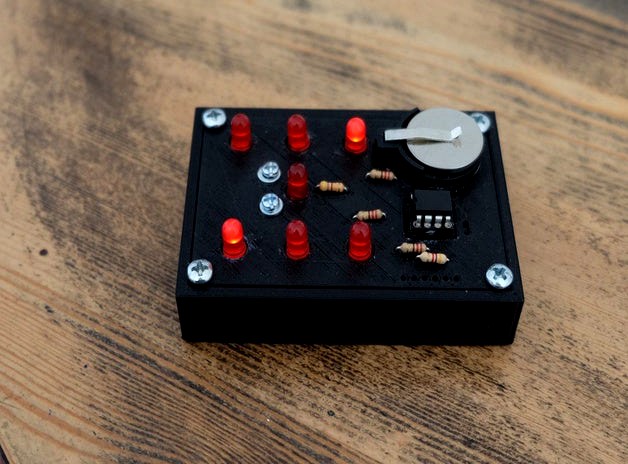
3d printed electronic dice
by Thingiverse
Last crawled date: 6 years, 5 months ago
This is an 3D printed electronic dice. New number is obtained when the dice is shaked.
Print dice.stl and dicesup.stl.
Needed components:
6 low power (2mA) leds
3 x 220 Ohm resistorS
1 x 470 Ohm resitor
1 4.7 KOhm resistor
Pic12F675 microcontroller (programmed with hex file)
8 pin ic support
CR2032 battery
CR2032 support
2 x 3mm screws and nuts
4x 3mm screws
1 washer
Insert the electronic components in the holes. Then you have to solder the components using their legs or wires (see the picture). The leds and IC support must be glued to the card.
Use a washer in the cylinder as a movement sensor (when the dice is shaked the two screws are connected and the microcontroller is reset : a new number is generated).
The board is designed using a graphic interface Circuit3D (https://github.com/jdiouris/circuit3D) which generates an openscad model of the board. This software is a work in progress.
You can see the dice in this video:https://www.youtube.com/watch?v=-9sEBJ7oCw8
Print dice.stl and dicesup.stl.
Needed components:
6 low power (2mA) leds
3 x 220 Ohm resistorS
1 x 470 Ohm resitor
1 4.7 KOhm resistor
Pic12F675 microcontroller (programmed with hex file)
8 pin ic support
CR2032 battery
CR2032 support
2 x 3mm screws and nuts
4x 3mm screws
1 washer
Insert the electronic components in the holes. Then you have to solder the components using their legs or wires (see the picture). The leds and IC support must be glued to the card.
Use a washer in the cylinder as a movement sensor (when the dice is shaked the two screws are connected and the microcontroller is reset : a new number is generated).
The board is designed using a graphic interface Circuit3D (https://github.com/jdiouris/circuit3D) which generates an openscad model of the board. This software is a work in progress.
You can see the dice in this video:https://www.youtube.com/watch?v=-9sEBJ7oCw8