
Thingiverse
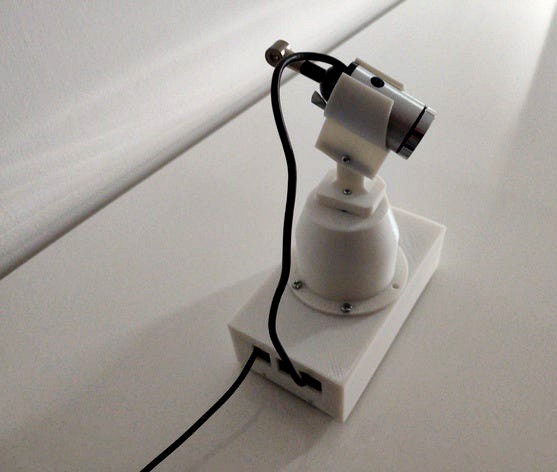
2 Axis IP Camera with Raspberry Pi 3
by Thingiverse
Last crawled date: 6 years, 5 months ago
Just to improve my python skills I created a 2 Axis Camera with an Raspberry Pi using
" Motion " as streamer and my own Python Script to control the two Servo's " MG 90 "
via remote or as stand alone.
Be aware the ground plate is not included because
I had some piece of aluminium in store and it will make the device a bit heavier.
You could take a piece of wood as well.
I used
PLA
webcam: https://www.amazon.de/gp/product/B01FDCK6FS/ref=ppx_yo_dt_b_search_asin_title?ie=UTF8&psc=1
servo: https://www.amazon.de/gp/product/B07FQMTLD4/ref=ppx_yo_dt_b_asin_title_o03_s00?ie=UTF8&psc=1
https://www.file-upload.net/download-13847381/TRIM_20200105_120410.mp4.html
That would be the code I use ;-)
I know that could all be better but it works for me.
I already work on an webinterface in php written.
You have create a " servo_dreh_n.txt " in the same Folder as the script.
!/usr/bin/python3
import RPi.GPIO as GPIO
import time
import socket
import threading
servo_kipp = 23
servo_dreh = 18
GPIO.setmode(GPIO.BCM)
GPIO.setup(servo_dreh, GPIO.OUT)
GPIO.setup(servo_kipp, GPIO.OUT)
d = GPIO.PWM(servo_dreh, 50) # GPIO 18 als PWM mit 50Hz
d.start(2.5) # Initialisierung
d.ChangeDutyCycle(0)
k = GPIO.PWM(servo_kipp, 50) # GPIO 18 als PWM mit 50Hz
k.start(2.5) # Initialisierung
k.ChangeDutyCycle(0)
print('Test SERVO')
d.ChangeDutyCycle(2.5)
time.sleep(0.5)
d.ChangeDutyCycle(12.5)
time.sleep(0.5)
d.ChangeDutyCycle(7.5)
time.sleep(0.5)
d.ChangeDutyCycle(0)
time.sleep(0.5)
k.ChangeDutyCycle(2.5)
time.sleep(0.5)
k.ChangeDutyCycle(12.5)
time.sleep(0.5)
k.ChangeDutyCycle(7.5)
time.sleep(0.5)
k.ChangeDutyCycle(0)
def dreh_by_read():
print('readline')
with open('/home/pi/Servo_1/servo_dreh_n.txt', "r") as fo:
first_line = fo.readline()
print(first_line.strip('HTTP 1.1'))
ku = first_line[:-14]
print(ku)
x = float(ku)
d.ChangeDutyCycle(x)
time.sleep(0.5)
d.ChangeDutyCycle(0)
def kipp_by_read():
print('readline')
with open('/home/pi/Servo_1/servo_dreh_n.txt', "r") as fo:
first_line = fo.readline()
print(first_line.strip('HTTP 1.1'))
ku = first_line[:-14]
print(ku)
x = float(ku)
k.ChangeDutyCycle(x)
time.sleep(0.5)
k.ChangeDutyCycle(0)
bind_ip = '192.168.178.66' # ip of the Raspberry
bind_port = 9999
server = socket.socket(socket.AF_INET, socket.SOCK_STREAM)
server.bind((bind_ip, bind_port))
server.listen(5) # max backlog of connections
print ('Listening on {}:{}'.format(bind_ip, bind_port))
def handle_client_connection(client_socket):
request = client_socket.recv(1024)
client_socket.send(b'Ack')
request = request.decode()
clean = request.split('/', 1)[1]
foo_clean = clean.split('', 1)[0]
with open('/home/pi/Servo_1/servo_dreh_n.txt', 'r+') as zoo:
zoo.write(foo_clean)
if 'DREH' in clean:
print(' Doing dreh ')
dreh_by_read()
elif 'KIPP' in clean:
print(' Doing kipp')
kipp_by_read()
client_socket.close()
while True:
client_sock, address = server.accept()
print ('Accepted connection from {}:{}'.format(address[0], address[1]))
client_handler = threading.Thread(
target=handle_client_connection,
args=(client_sock,) # without comma you'd get a... TypeError: handle_client_connection() argument after * must be a sequence, not _socketobject
)
client_handler.start()
Enjoy
" Motion " as streamer and my own Python Script to control the two Servo's " MG 90 "
via remote or as stand alone.
Be aware the ground plate is not included because
I had some piece of aluminium in store and it will make the device a bit heavier.
You could take a piece of wood as well.
I used
PLA
webcam: https://www.amazon.de/gp/product/B01FDCK6FS/ref=ppx_yo_dt_b_search_asin_title?ie=UTF8&psc=1
servo: https://www.amazon.de/gp/product/B07FQMTLD4/ref=ppx_yo_dt_b_asin_title_o03_s00?ie=UTF8&psc=1
https://www.file-upload.net/download-13847381/TRIM_20200105_120410.mp4.html
That would be the code I use ;-)
I know that could all be better but it works for me.
I already work on an webinterface in php written.
You have create a " servo_dreh_n.txt " in the same Folder as the script.
!/usr/bin/python3
import RPi.GPIO as GPIO
import time
import socket
import threading
servo_kipp = 23
servo_dreh = 18
GPIO.setmode(GPIO.BCM)
GPIO.setup(servo_dreh, GPIO.OUT)
GPIO.setup(servo_kipp, GPIO.OUT)
d = GPIO.PWM(servo_dreh, 50) # GPIO 18 als PWM mit 50Hz
d.start(2.5) # Initialisierung
d.ChangeDutyCycle(0)
k = GPIO.PWM(servo_kipp, 50) # GPIO 18 als PWM mit 50Hz
k.start(2.5) # Initialisierung
k.ChangeDutyCycle(0)
print('Test SERVO')
d.ChangeDutyCycle(2.5)
time.sleep(0.5)
d.ChangeDutyCycle(12.5)
time.sleep(0.5)
d.ChangeDutyCycle(7.5)
time.sleep(0.5)
d.ChangeDutyCycle(0)
time.sleep(0.5)
k.ChangeDutyCycle(2.5)
time.sleep(0.5)
k.ChangeDutyCycle(12.5)
time.sleep(0.5)
k.ChangeDutyCycle(7.5)
time.sleep(0.5)
k.ChangeDutyCycle(0)
def dreh_by_read():
print('readline')
with open('/home/pi/Servo_1/servo_dreh_n.txt', "r") as fo:
first_line = fo.readline()
print(first_line.strip('HTTP 1.1'))
ku = first_line[:-14]
print(ku)
x = float(ku)
d.ChangeDutyCycle(x)
time.sleep(0.5)
d.ChangeDutyCycle(0)
def kipp_by_read():
print('readline')
with open('/home/pi/Servo_1/servo_dreh_n.txt', "r") as fo:
first_line = fo.readline()
print(first_line.strip('HTTP 1.1'))
ku = first_line[:-14]
print(ku)
x = float(ku)
k.ChangeDutyCycle(x)
time.sleep(0.5)
k.ChangeDutyCycle(0)
bind_ip = '192.168.178.66' # ip of the Raspberry
bind_port = 9999
server = socket.socket(socket.AF_INET, socket.SOCK_STREAM)
server.bind((bind_ip, bind_port))
server.listen(5) # max backlog of connections
print ('Listening on {}:{}'.format(bind_ip, bind_port))
def handle_client_connection(client_socket):
request = client_socket.recv(1024)
client_socket.send(b'Ack')
request = request.decode()
clean = request.split('/', 1)[1]
foo_clean = clean.split('', 1)[0]
with open('/home/pi/Servo_1/servo_dreh_n.txt', 'r+') as zoo:
zoo.write(foo_clean)
if 'DREH' in clean:
print(' Doing dreh ')
dreh_by_read()
elif 'KIPP' in clean:
print(' Doing kipp')
kipp_by_read()
client_socket.close()
while True:
client_sock, address = server.accept()
print ('Accepted connection from {}:{}'.format(address[0], address[1]))
client_handler = threading.Thread(
target=handle_client_connection,
args=(client_sock,) # without comma you'd get a... TypeError: handle_client_connection() argument after * must be a sequence, not _socketobject
)
client_handler.start()
Enjoy